What Is a Living Spec? Product Requirements for AI Coding
A living spec keeps product requirements and decision history current for people and AI coding agents. Learn four principles for maintaining one after launch.
A product spec can start going out of date as soon as you ship.
That is why a living spec matters.
Before we get into it, what is a spec?
Short for specification, it describes what a product should do and how it should work. In this article, that includes product requirements documents (PRDs), feature specifications, and screen specifications.
AI is changing more than coding, testing, and design. It is also changing how teams work through product decisions. Consider this conversation.
A: “Is this the spec I should use?”
B: “Yes. We keep all our product requirements there.”
A week later
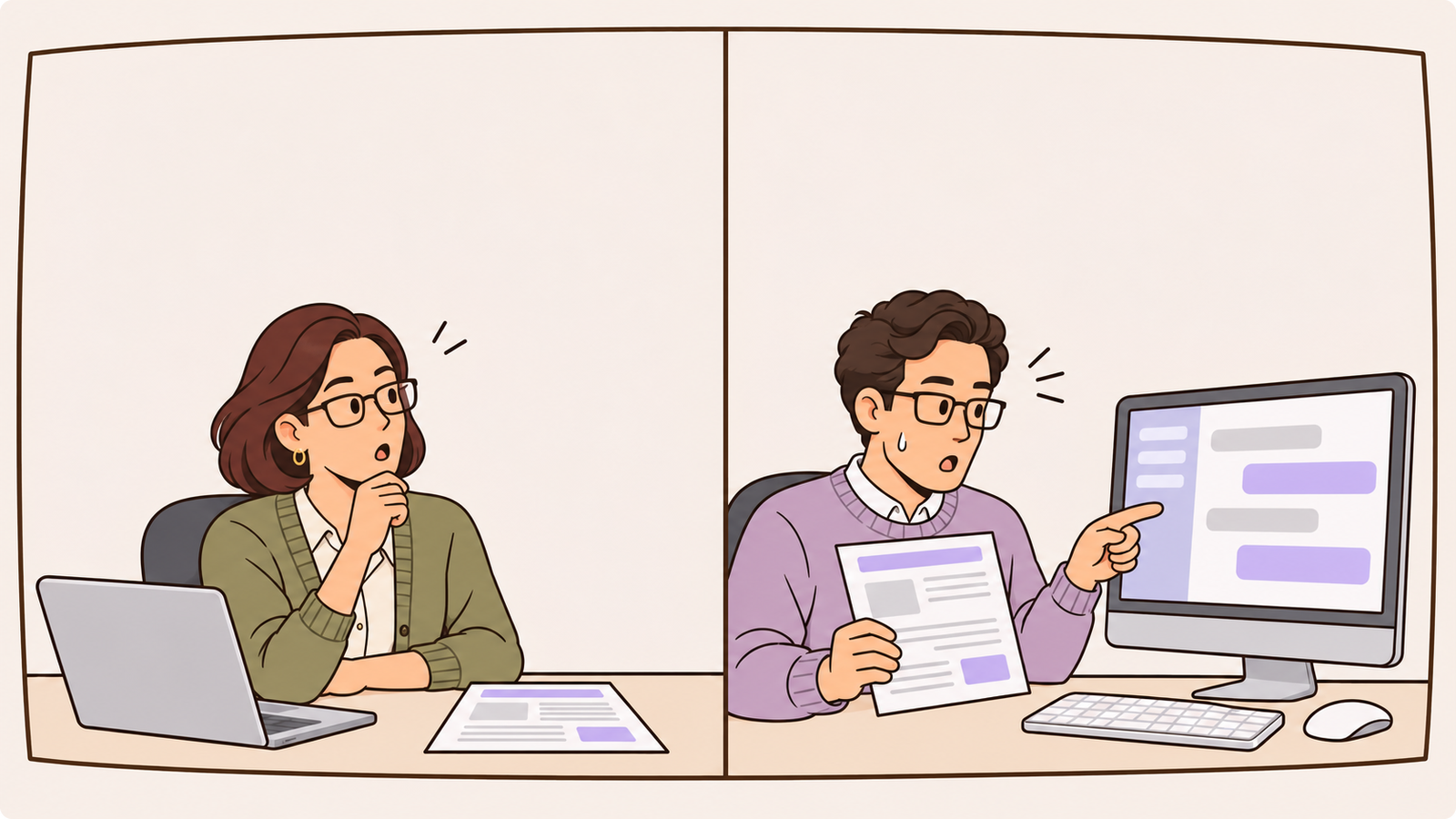
A: “I just noticed the live screens do not quite match the spec.”
B: “We tried three quick prototypes the day before launch and shipped the second one. The spec probably still describes the first.”
If you have joined a new team or taken over a project midway through, this may sound familiar.
With tools like Claude Code or Codex, trying several prototypes has become much easier.
Some teams now start by building screens. They try three versions in the morning, review them together, and discard two in the afternoon.
Before long, someone says:
“The spec is a little different from tomorrow’s release. Just ask me if anything is unclear.”
You can probably see why the spec needs to stay alive. It was accurate on the day someone wrote it.
What never made it back into the document was the decision in Slack the day before release, the feature deferred during QA, or the hotfix shipped after support requests started coming in.
A project can keep moving even with a half-outdated spec. There is usually someone nearby who can say, “Just ask me.”
But who else is reading that document now?
AI.
When we delegate work to a coding agent, we often give it the spec first. The more decisions an agent makes, the more those instructions matter.
An agent may ask for clarification or approval.
What it cannot reliably recover is an override that only exists in a teammate’s memory. If the written spec looks authoritative, it may build exactly what the document says.
Try this question on your own team:
“If we handed our current spec to Claude Code, would it have enough information to reproduce how the product actually works today?”
Researchers from Carnegie Mellon University and Google examined 266 active, popular public repositories using spec-driven development.
They found that 81.5% of spec files had only one recorded commit at their current path. That does not prove every unchanged file is outdated, but it raises an important question about maintenance.
Source: Agarwal et al., Spec-Driven Development as Prescribed and as Practiced, 2026.
Let’s look at why a spec that stops changing becomes a problem, and what it takes to keep one useful after release.
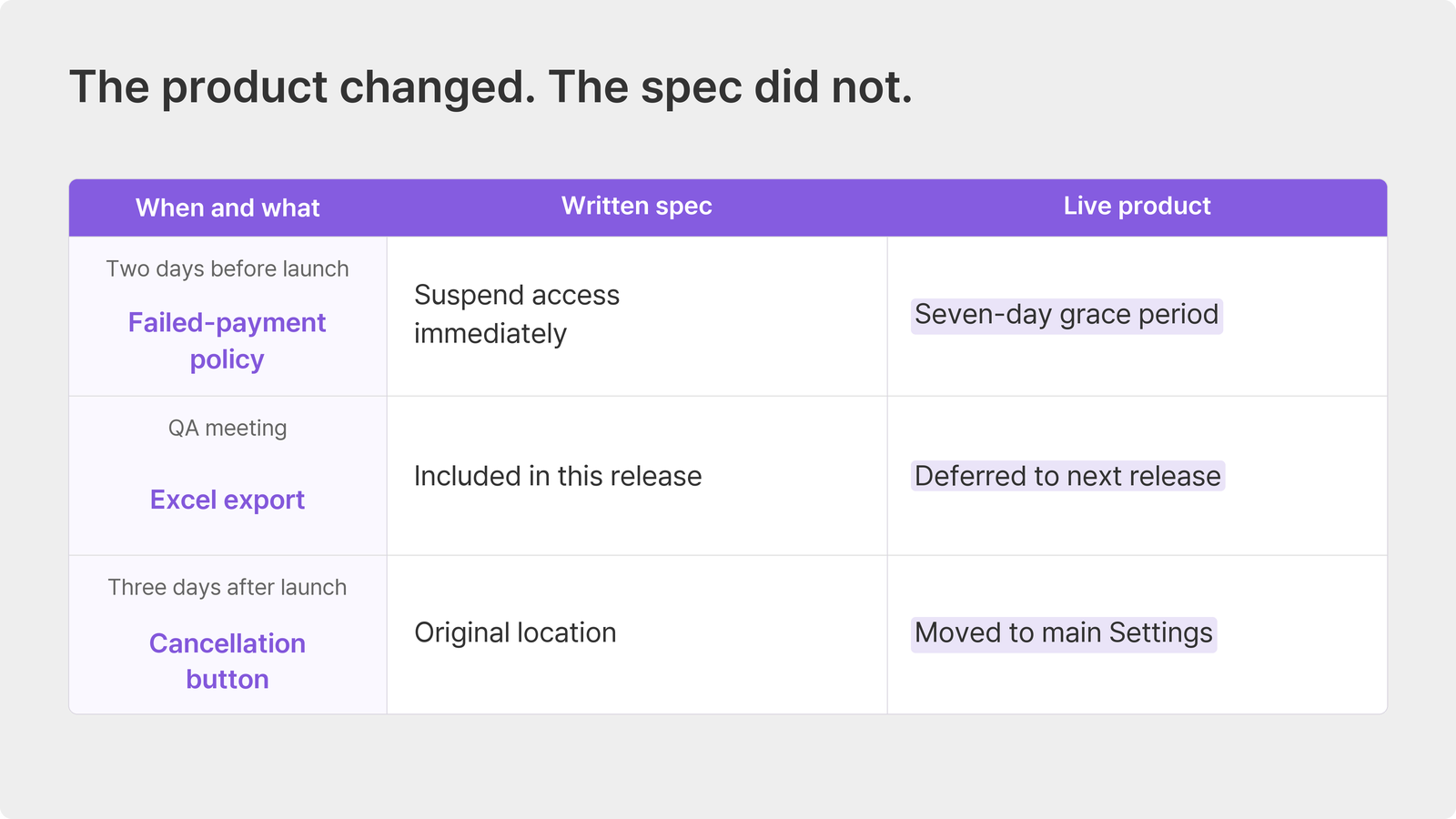
Three moments when a spec falls behind
A spec rarely becomes outdated all at once. You may recognize one of these moments.
Two days before launch in Slack
“If a payment fails, let’s allow seven days instead of suspending access immediately. The CEO approved it.”
A developer acknowledges the message and updates the code that day. The spec still says access stops as soon as payment fails.
During a QA meeting
“We need to move the Excel export to the next release.”
Everyone agrees and the meeting ends. Excel export is still listed in the spec, with no sign that it was deferred.
Three days after launch when support requests pile up
“Customers cannot find the cancellation button. Move it to the main Settings screen.”
The fix ships that day. The screen specification still points to the old location.
These are not simply cases of people being careless. Decisions happen in conversations, while the spec sits outside them.
“We will ship the fix now and update the docs later” is usually sincere. Then the next urgent task arrives.
The researchers make an important distinction: a missing revision history alone does not establish that a file is stale.
Yet their interviews with 21 practitioners repeatedly surfaced the same problem. Code changes while the spec is left behind.
They describe two kinds of divergence.
The implementation can depart from the spec while it is being built, or the product can change later while the spec stays the same. The three examples above show how easily the second kind happens.
Who reads the spec a few months later
An outdated document may not cause an immediate incident. Its effects can surface quietly, months later.
A new support specialist finishes onboarding and uses the spec to answer a customer.
“If your payment fails, your access may be suspended. Please check the card on your account.”
The customer replies, “But I can still use the service.”
A sales rep scans the feature list while finishing a proposal and adds “Excel export supported.”
A week or two after signing, the customer asks, “Where can we download the coupon records as a spreadsheet?”
Then there is the AI coding agent.
Asked to improve the cancellation screen, it reads the old spec and puts the cancellation button back in its previous location. A change the team deliberately made has been undone.
After one bad answer, a support specialist or sales rep may stop trusting the document. Unless we correct the source or supply the missing context, the next AI task can repeat the same mistake.
Thoughtworks put AI-driven documentation sprawl in the Caution ring of its November 2026 Technology Radar.
Its warning is about large volumes of polished but unmaintained or contradictory documents. Coding agents can then build on information that no longer deserves their trust.
Source: Thoughtworks Technology Radar Volume 35, November 2026.
Abandoning specs is not the answer.
In Stack Overflow’s 2026 Developer Survey, 85.2% of respondents to the project-context question selected project goals or requirements as important context. Code, repositories, or technical documentation came next at 73.3%.
Source: Stack Overflow 2026 Developer Survey, Knowledge data.
We risk giving AI the very information it needs most in a form that no longer describes the product.
What Is a Living Spec?
A living spec changes with the product and records why it changed, so people and AI can use it as a reliable account of how things work today.
The idea of living documentation is not new. Software testing has long used the term for documentation kept current alongside a changing system.
As more teams write specifications before delegating work to AI, that maintenance question matters to product planning too.
The document’s job is also changing.
In a familiar development process, the PRD asked for agreement before implementation: “Is this what we should build?” Once approved, it was easy to treat the document as finished.
Some teams now try prototypes first and document the option they choose afterward.
Product Career Academy describes that shift as the PRD becoming a decision record. It needs to explain why this version won, which alternatives were rejected, and where the scope ends.
Source: Product Career Academy, The PRD Isn’t Dead. It Just Changed Jobs., September 2026.
A document written once before development becomes something the team revisits throughout the build and after release.
The opposite is a snapshot spec: an accurate picture of the day it was written, with no promise that it still matches today.
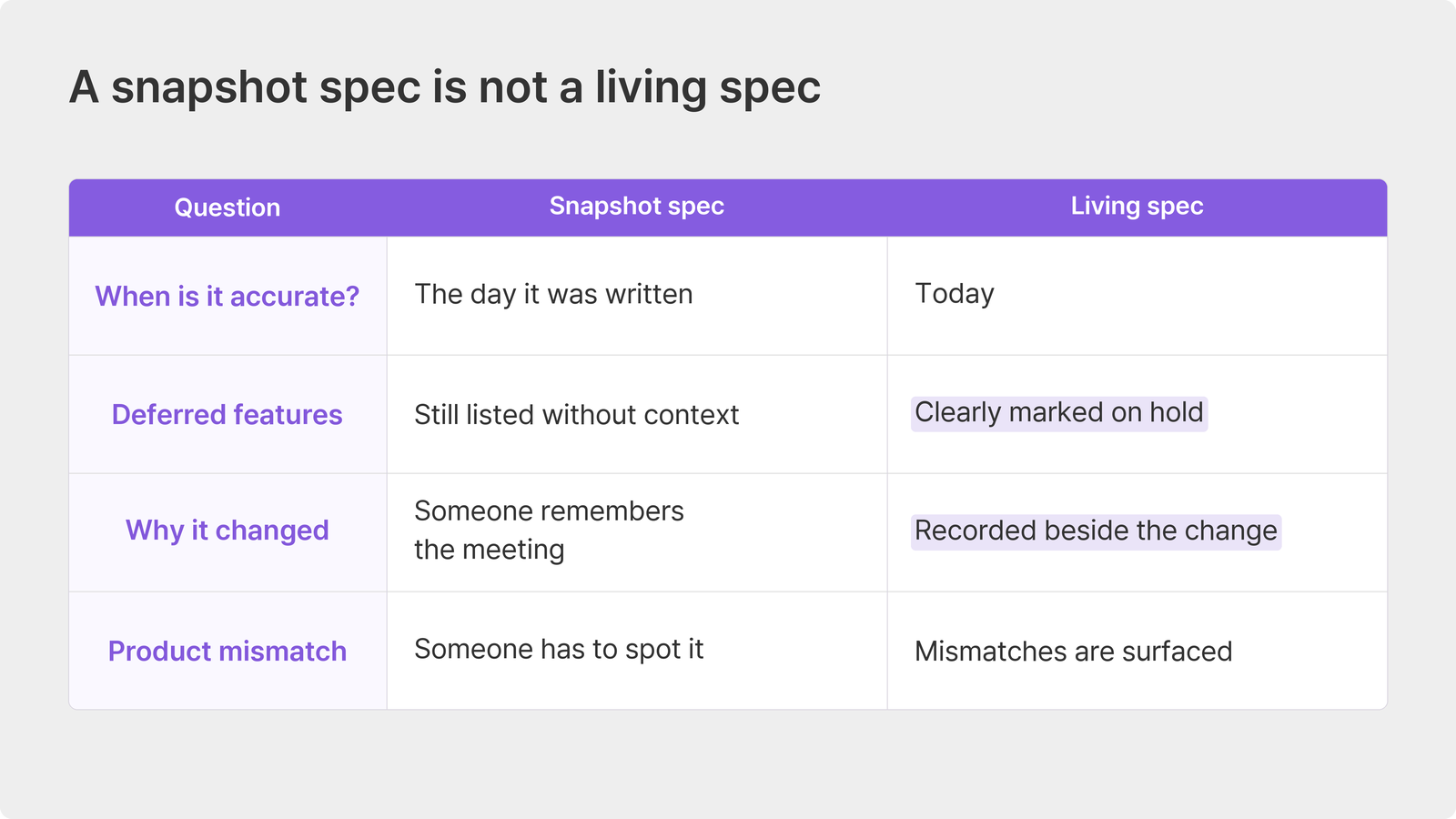
This connects to the single source of truth (SSOT) we discussed previously.
SSOT asks where the authoritative reference lives. A living spec asks whether that reference is still right three months later. Centralizing the document does not help if it still describes the product before launch.
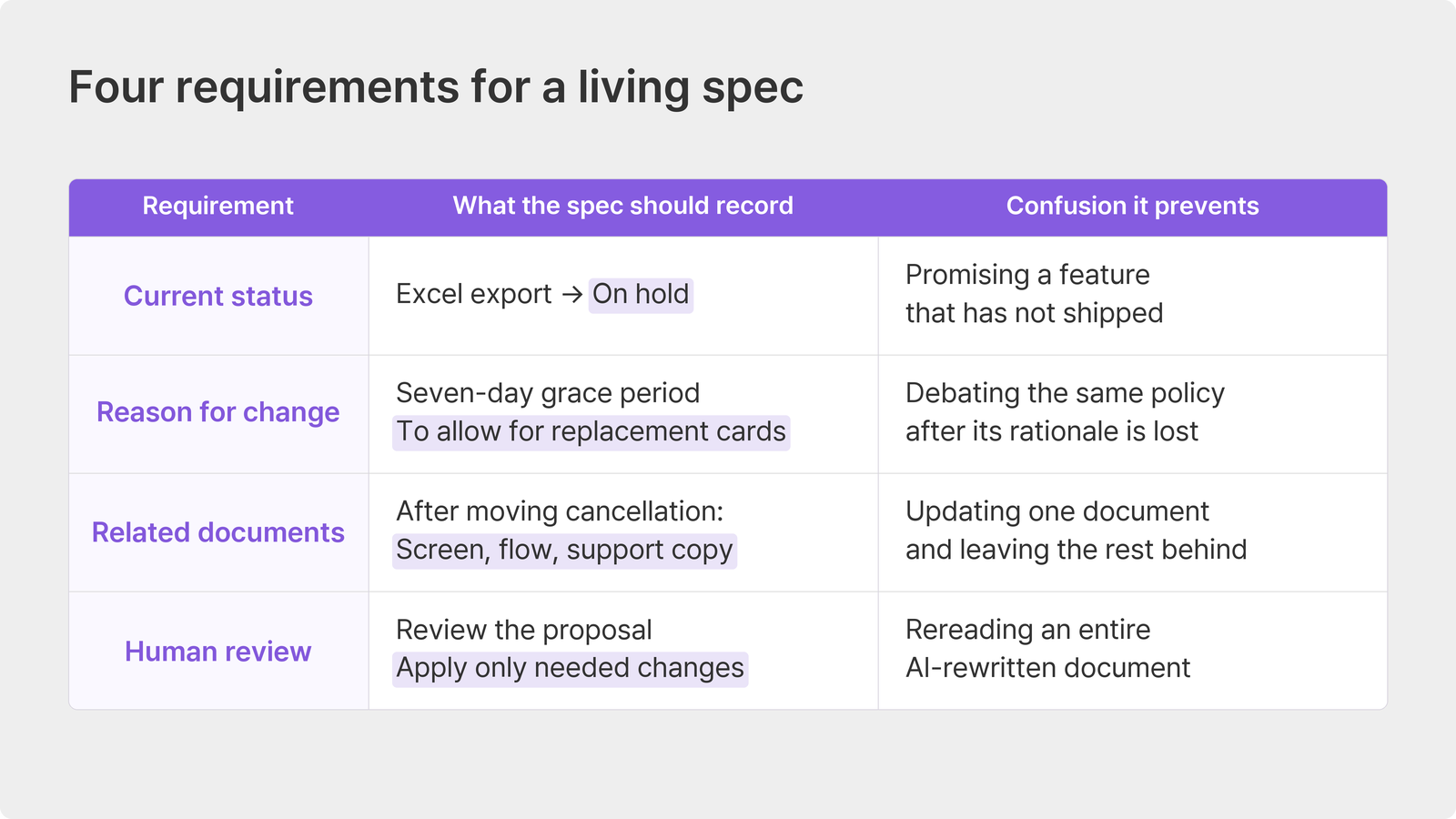
Four requirements for a living spec
What would make the spec in those three examples trustworthy again?
1 Every item has a current status
Excel export did not need to disappear. It needed a clear label saying it had moved to a later release.
Planned, approved, in development, shipped, or on hold: the status tells both people and AI what exists now.
It also gives the sales rep a reason not to promise a deferred feature.
2 The reason stays beside the change
Replacing “suspend immediately” with “allow seven days” is not enough. Keep the reason too: customers waiting for replacement cards were losing access and canceling.
Without that explanation, someone may ask a year later, “Why seven days?
Can we shorten it?” There is no guarantee the person who remembers will still be there.
In the same Stack Overflow survey, 44% selected prior decisions and rationale as important project context.
3 Related documents are checked for mismatches
Moving the cancellation button affects more than one screen.
Its screen description, the steps to reach it, and the support instructions all need review.
Keeping every dependency in someone’s head is fragile.
A living-spec workflow needs a way to surface the places that may no longer agree when one decision changes.
4 People decide what to apply
“Couldn’t we just ask AI to rewrite the whole spec?”
AI can help find discrepancies and draft revisions.
But a full rewrite can also change wording that did not need touching. If every paragraph looks different, someone has to read everything again.
A more manageable approach is to ask for targeted proposals and review those changes in place.
There is another reason to keep a person involved.
When the spec and product disagree, the mismatch alone does not tell us which one is wrong. The cancellation-button example calls for a document update. If an agent implemented the wrong behavior, the product needs the fix instead.
The Carnegie Mellon and Google researchers recommend a similar direction: tools detect relevant changes and draft updates for human confirmation.
“We barely have time to breathe before launch. When are we supposed to do all this?”
That is why maintenance needs a place in the workflow, rather than relying on good intentions.
How to Keep Product Specs Up to Date
You do not need a new document tool to begin.
When a decision changes in a team chat, reply in the thread with a link to the updated spec. A thread without that link still needs its decision written back into the document.
Add a spec-update check to your release checklist. Even an urgent post-launch fix passes through a release, which gives you another opportunity to catch it.
Mark a deferred feature for a later release instead of deleting it. Otherwise, you lose the record that it was deliberately postponed.
You can do all of this in Notion or Confluence today. The limitation is that someone still has to remember, find the decision in the conversation, and move it into the spec.
How this works in Manyfast
Manyfast is a software-planning workspace for PRDs, feature specifications, user flows, and wireframes within one project.
Here, we will use Sources to capture decisions from a meeting and keep their supporting context.
Extract decisions from meeting notes
Write the meeting notes in Sources, then choose the decision-extraction action and the relevant project.
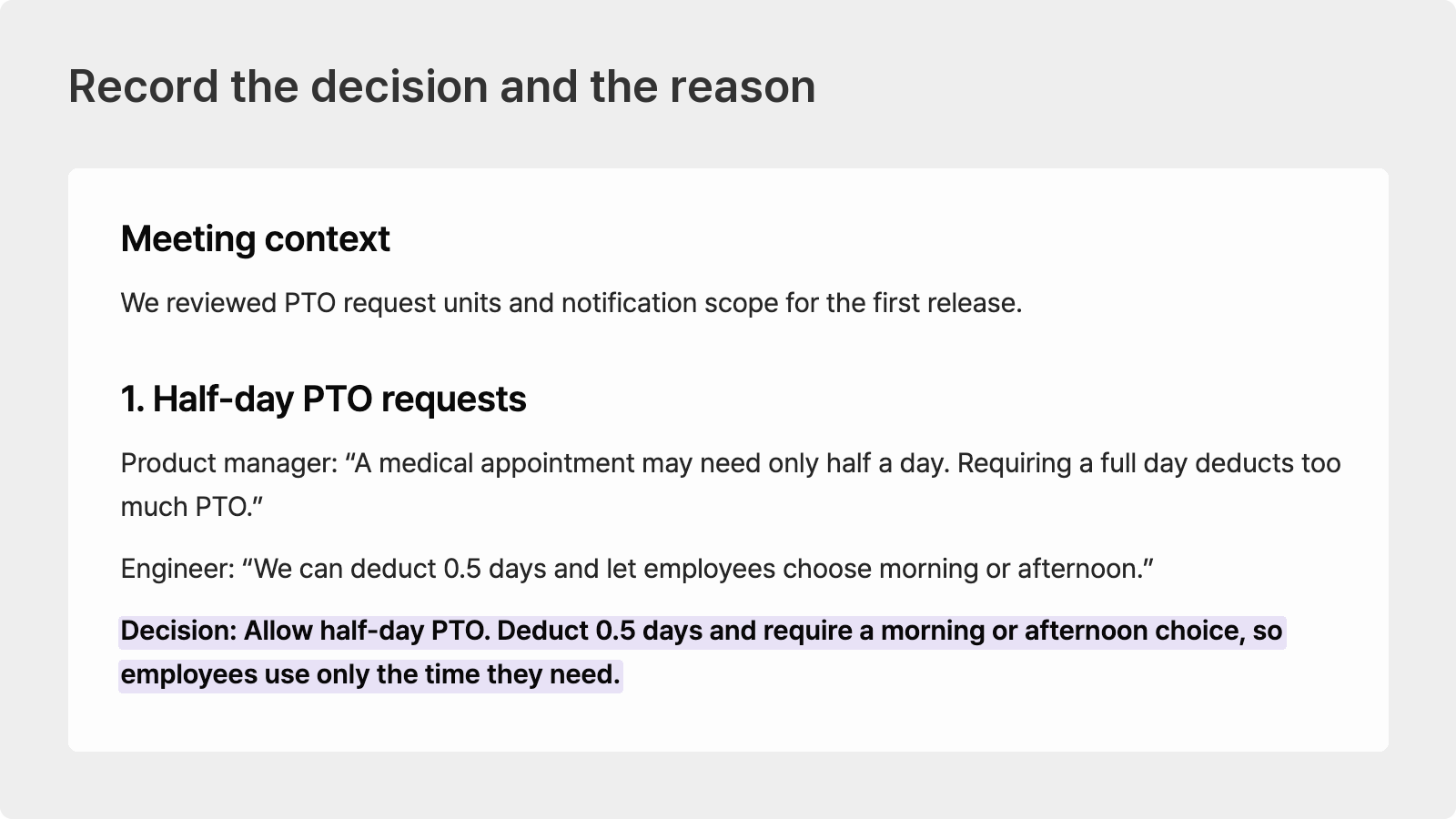
For a team PTO planner, the notes might record two agreements: a half-day request deducts 0.5 days from the employee’s balance, and Slack notifications are out of scope for the first release.
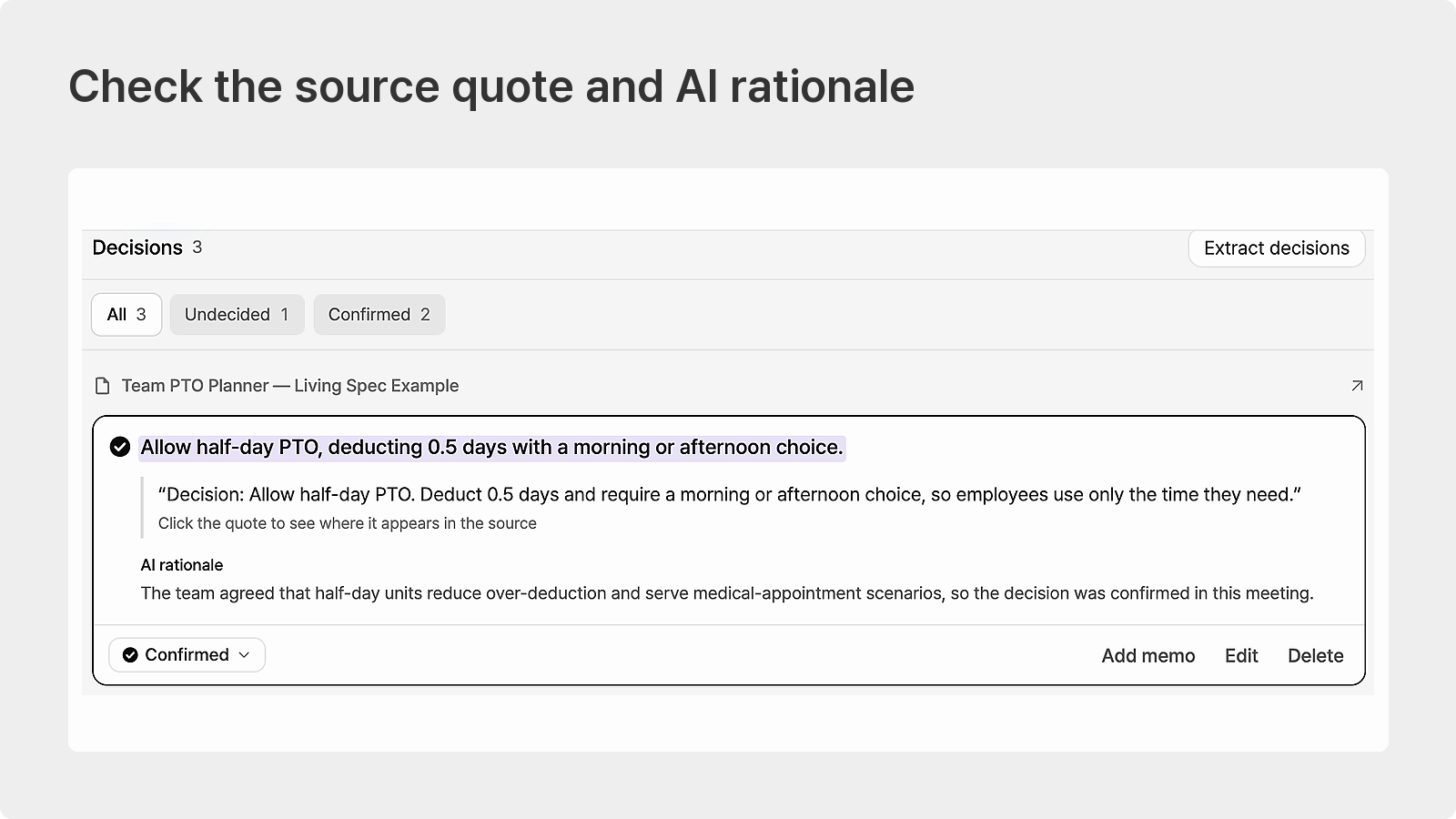
Check the original quote and the rationale
Expand an extracted decision to see the source quotation and AI rationale.
You can check why the team chose the half-day calculation or deferred Slack notifications against what was actually written. A reminder time the team has not agreed on is marked Undecided rather than becoming a settled requirement.
Apply the decisions you have reviewed
Extracted decisions are AI-generated drafts. Compare each one with the original notes before carrying the agreed decision into the spec.
For the deferred Slack notifications, keep the feature in the specification and mark it on hold rather than deleting it.
The reason for a change stays available, the deferred feature has a visible status, and a person decides what to apply.
Meeting decisions have a route back into the documents the team works from.
A useful place to start this week
“Just ask me if anything is unclear.”
When a team depends on that sentence, its real source of truth is someone’s memory.
A teammate may know whom to ask. An AI agent does not automatically have access to that conversation.
Think of one decision that changed in chat this week.
Open the spec and check whether it records both the decision and the reason. If it does not, start by adding those lines.
If you want to tell a new teammate, “You can trust the spec,” bring the planning materials you already use into Manyfast and start there.