The Skills PM Job Ads Are Really Asking For
A review of 133 PM and PO job ads shows how AI is changing the skills employers value. Explore practical ways to review AI drafts, record decisions with evidence, and build something from a product plan.

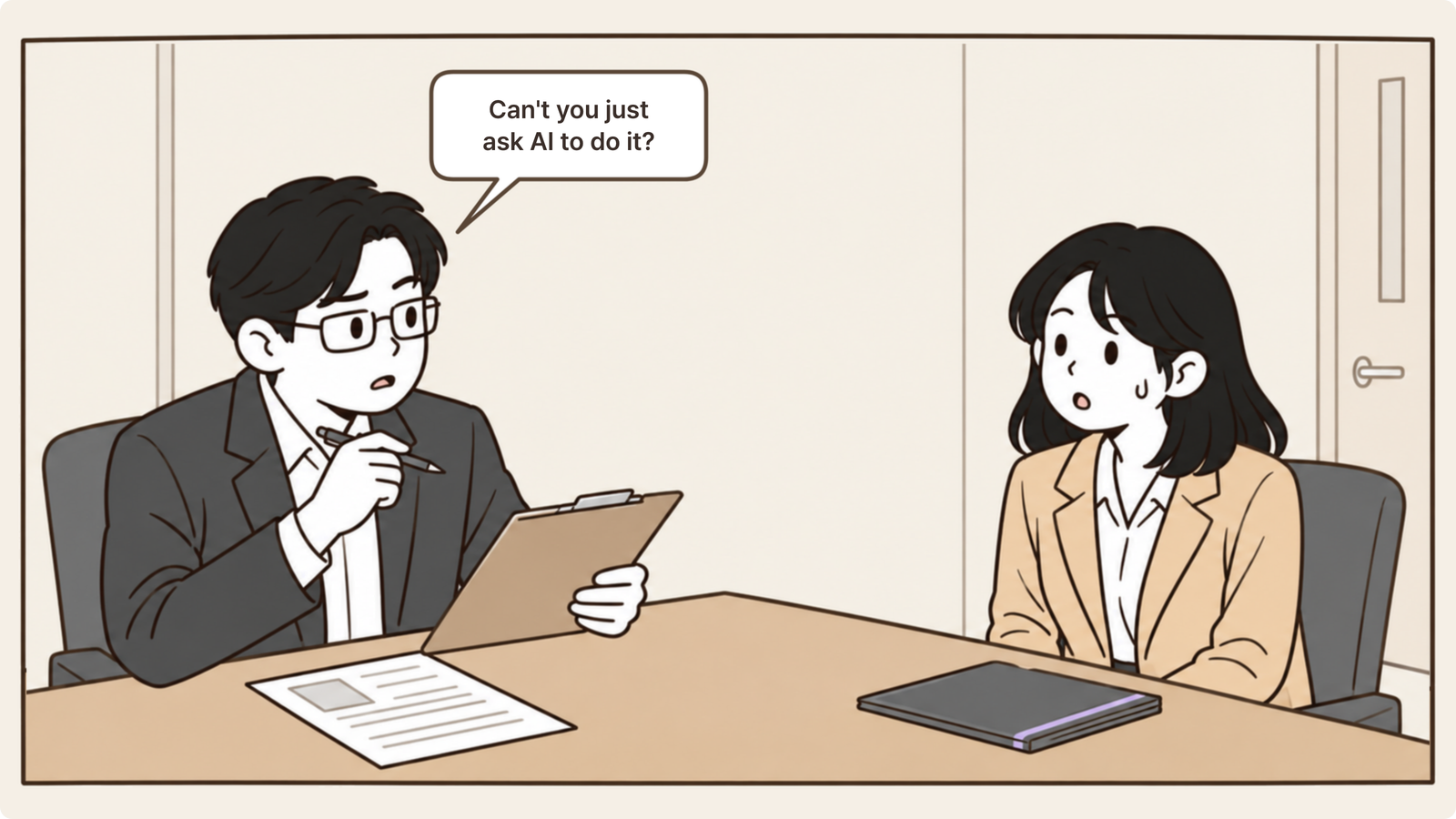
“If AI can do the planning too, why do we need PMs?”
I recently came across a post in a job-hunting community. Someone had been asked this question in an interview for an entry-level PM role.
I went straight to the comments before I’d even finished reading the post.
“People still have to make the decisions.”
“AI doesn’t understand all the context behind a product plan.”
There were plenty of answers along those lines. As I read them, I realized I could say the same things. But I wasn’t sure I could back them up with a convincing argument or evidence.
So I picked up a book on PM skills.
Here’s what people who had worked as PMs at Korean tech companies and startups considered important.
Writing and speaking, ownership, English, curiosity and a willingness to learn, and the ability to work with different kinds of people.
One thing stood out: the word AI didn’t appear anywhere on the list.
Rather than relying on the book alone, I decided to read recent job ads too.
A job ad is a company’s description of the person it wants to hire. I figured that would make it a fairly candid account of the skills it values most.
This article is about what I found.
The list of skills expected of PMs hasn’t changed. What’s changed is which of those skills have become cheaper, which have become more valuable, and which are new.
The list of skills hasn’t changed
Let’s start with the familiar list.
In Principles for Product Managers, nine people who have worked as PMs and POs at Korean tech companies and startups identify five skills for people starting out in product management:
writing and speaking, ownership, English, curiosity and a willingness to learn, and the ability to work with different kinds of people.
Source: Lee Sang-beom et al., Principles for Product Managers, Golden Rabbit, 2023
It’s still a list I can read and agree with without much hesitation.
But open a PM job ad in 2026, and you’ll find requirements that this list doesn’t quite explain.
I read 133 job ads
I pulled the 200 most recent PM and PO listings on Wanted as of October 12, 2026, then kept those with PM, PO, product manager, or service planner in the title.
I focused on the wording in three sections: responsibilities, required qualifications, and preferred qualifications.
The first part looked much like the familiar list.
Communication and collaboration appeared in 121 of the 133 ads (91%).
Documentation such as product plans, requirements, and screen specifications appeared in around 100 (75–80%).
Prioritization and decision-making appeared in 90 (68%), and data and metrics in around 90 (67–69%).
Then came the lines that weren’t on the old list.
Experience using AI as a work tool appeared in 69 ads (52%).
Of those, 26 listed it as a requirement and 52 as a preferred qualification.
Hands-on experience building something appeared in 28 ads (21%).
Thirteen ads (10%) named AI coding tools such as Cursor or Claude Code.
Another 13 (10%) explicitly asked candidates to verify AI-generated output.
Here are a few examples of the wording:
“Someone who actively uses AI tools such as Claude Code in their work.”
“Someone who can use AI development tools and verify the results themselves.”
“Someone who has built and run a side project or personal product.”
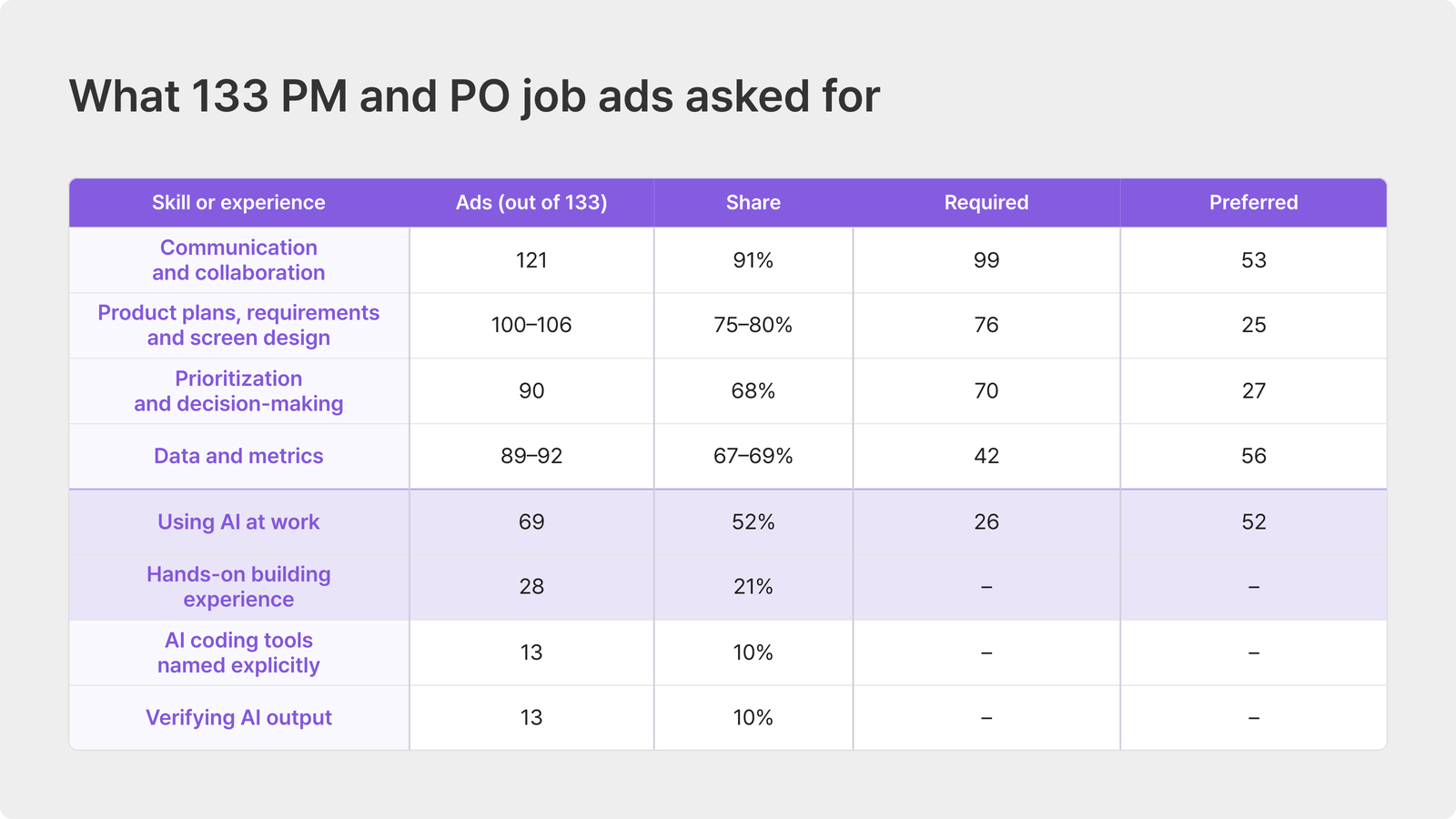
The table suggests these are still mostly nice-to-haves.
AI tool use appeared under preferred qualifications twice as often as under requirements.
Still, just a few years ago, these lines weren’t in job ads at all.
The skill that has become cheaper is writing
Product plans and requirements documents still appear in 75–80% of the ads.
Documentation clearly still matters.
The biggest change is that using AI to do the writing has become the default.
Deciding what should be written is still a person’s job.
Ask AI to “write a product plan for a first-order coupon,” for example, and it can produce a draft with an outline and screen flows in about five minutes.
But whether the coupon can be combined with other discounts, or whether someone who closes an account and signs up again counts as a first-time customer, are choices AI will simply fill in with plausible answers.
A person still has to decide what makes sense for the company.
When Lenny’s Newsletter surveyed 1,750 people working in tech in December 2025, drafting PRDs was the most common way PMs used AI, at 21.5%.
When AI can produce the first draft, being good at writing a product plan is no longer much of a differentiator.
Knowing where that draft is wrong has become a skill in its own right.
Deciding and reviewing have become more valuable
Among required qualifications in the job ads, prioritization and decision-making appeared more often than anything except communication, in 70 ads.
The more AI can produce, the more it matters to have someone who can decide what not to build.
Another skill has become more valuable too:
the judgment to review AI-generated work.
Job ads have started asking for people who can “verify the results themselves.”
In a July 2026 Adaptavist survey of 2,500 knowledge workers, 42% said they were spending more time checking AI output than AI had saved them.
And 52% said they had corrected work a colleague had produced with AI.
In Lenny’s Newsletter’s 2026 survey, only 22% were worried about losing their jobs to AI. But 41% were worried about the quality of the work suffering.
AI tends toward the average. People make the decisions that depart from it.
Showing that you can make those decisions is part of being a capable PM today.
The new skill is building something you can show
Hands-on building experience appeared in 21% of the ads; AI coding tools in 10%.
Those numbers are still small. But these weren’t even categories in job ads two years ago.
Some companies outside Korea have gone further.
An Amazon Ring opening used the title “Senior Product Manager, Builder” and required experience building prototypes with AI coding tools.
Cursor’s PM job ad put it this way:
“Product at Cursor is not a traditional PM org. PMs here are technical builders.
You should be able to build and deploy an app yourself.”
The expectation is clear: PMs in Cursor’s product organization should be able to build and ship an app on their own.
LinkedIn replaced its long-running Associate Product Manager program with an Associate Product Builder program that combines coding, design, and product management.
In ProductPlan’s State of Product Management 2026 survey, 73.4% of respondents working in product said the PM role was heading toward a blend of product management, design, and engineering.
We should be clear about how far this shift has gone.
In Korea, these skills are starting to appear as preferred qualifications. At some global tech companies, they’re changing job titles.
The deliverable is shifting from a product plan to something you’ve built with that plan.

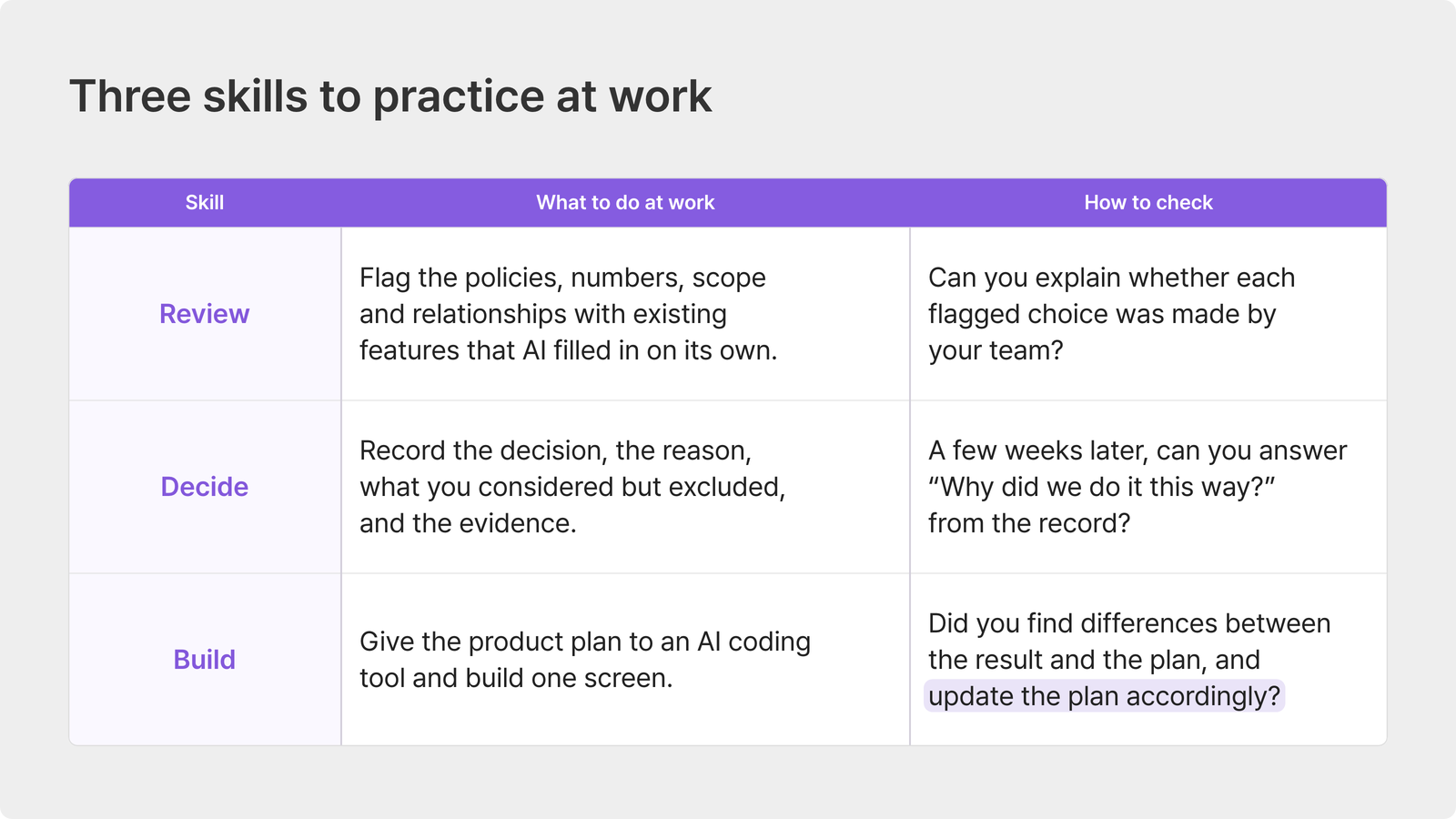
Here’s one way to put this into practice
Doing the work below and strengthening your portfolio won’t guarantee you a job.
But having looked at what PM job ads are asking for, I’d like to suggest a few ways to practice those skills in real work.
The ads broadly seem to be asking three things:
Can you review AI-generated work and identify what doesn’t fit your company or project?
Can you make a reasoned choice among AI’s suggestions about what to build now, what to leave out, and what to postpone?
Can you use AI to take a product from a plan to something that actually works?
Setting aside time to learn each skill would help, of course. But I think you can also practice by changing the order of the planning work you already do on a personal or company project.
1. Review the choices AI has already made for you
When you review an AI draft, start by looking for the decisions and values AI has filled in on its own, rather than how smoothly the writing reads.
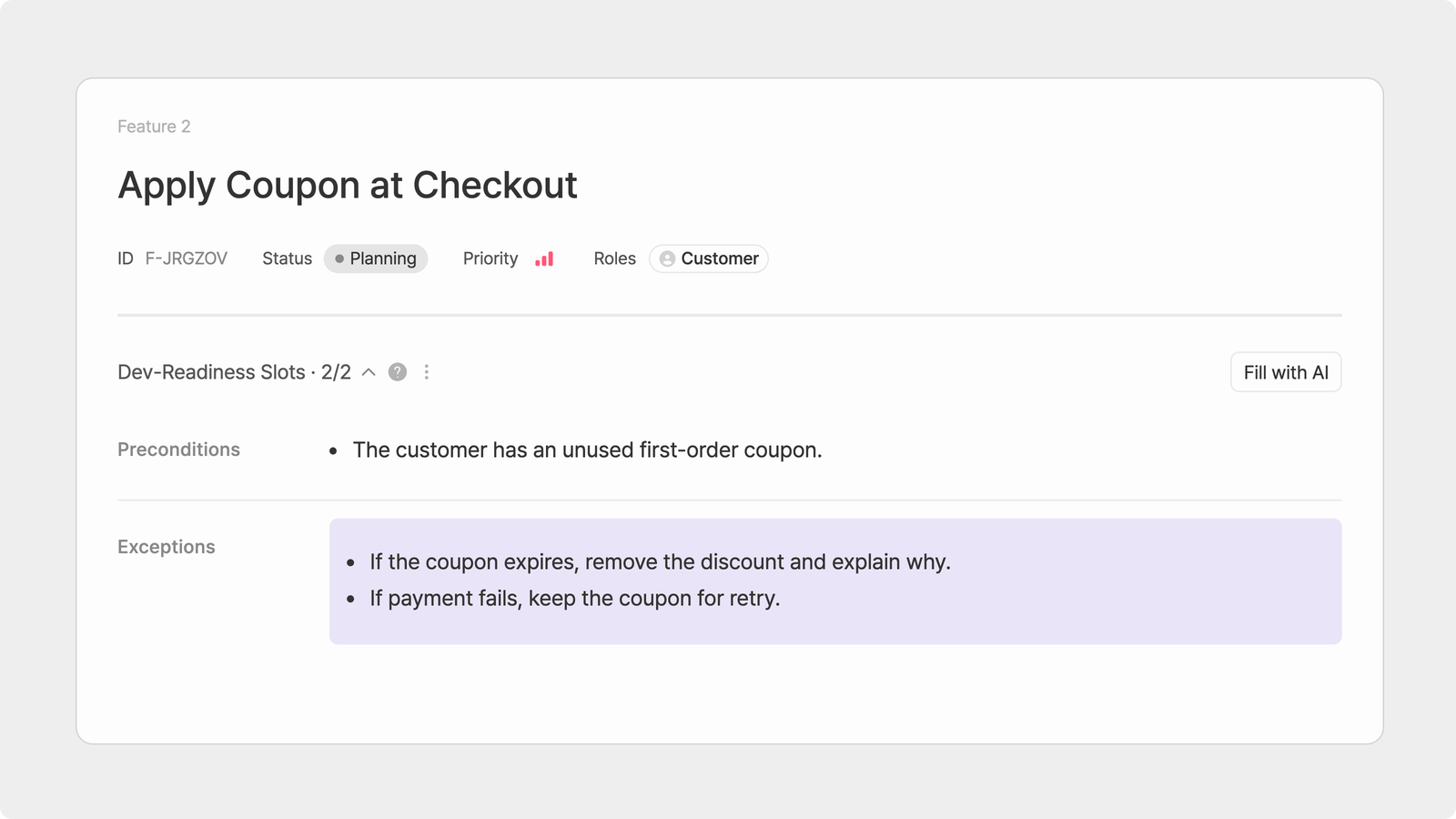
For the coupon example from earlier, that might mean checking the following:
Policy: Can it be combined with other discounts? Does someone who signs up again count as a first-time customer?
Numbers: Is the discount 10% or KRW 5,000? How long is the coupon valid?
Scope: Is it available only in the app, or on the web too?
Interaction with existing features: Does it conflict with the membership discount you already offer?
AI doesn’t usually leave these fields blank. It fills them with something plausible.
The first step is to mark those choices and ask, one by one, “Did we decide this, or did AI pick it?”
Leave a line explaining each change, and you’ll have a review checklist to use the next time you plan a similar feature.
2. Record the decision, the reason, and what you left out
As AI gives you more options, choosing what to keep and what to exclude becomes more of the PM’s job.
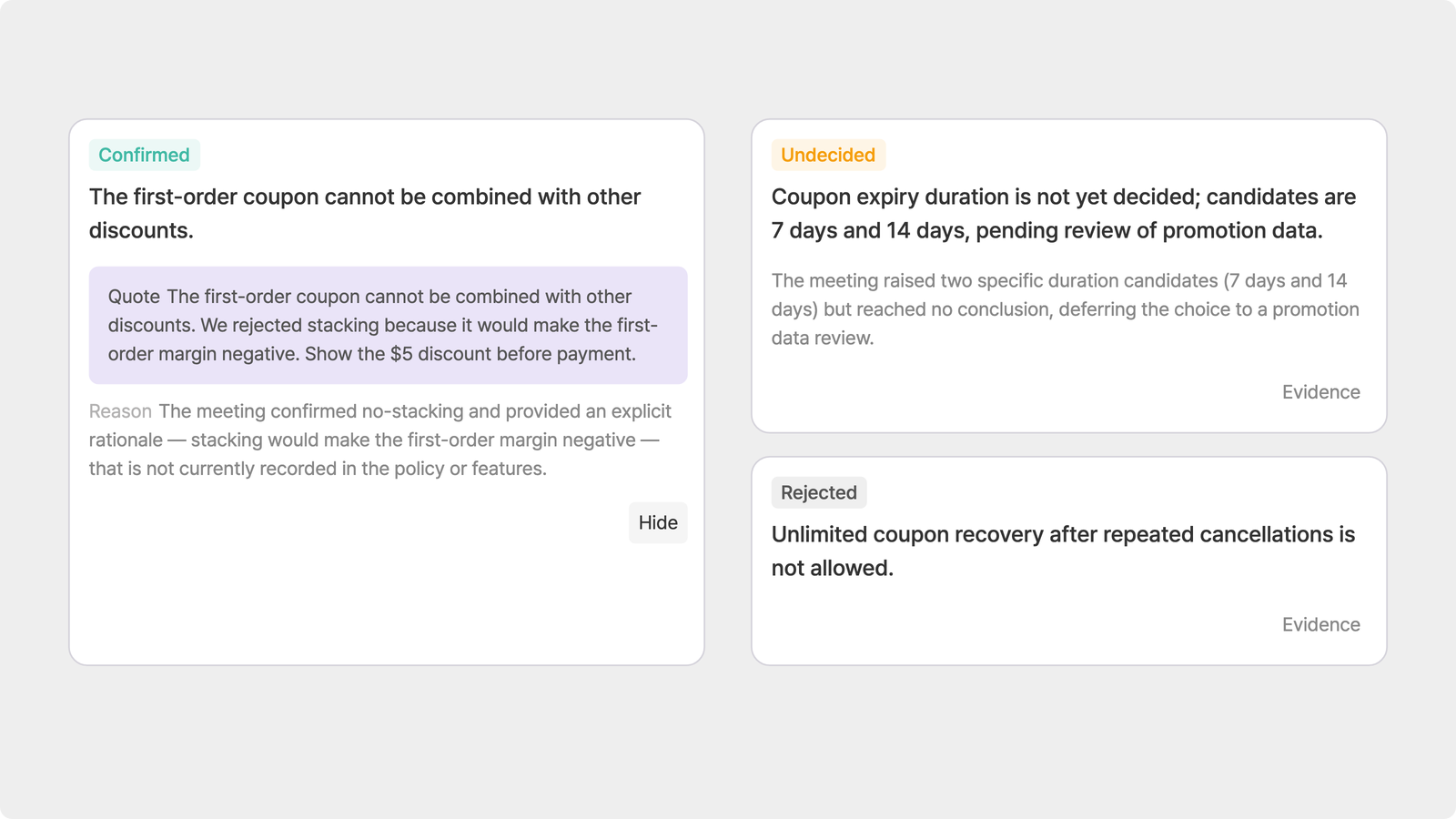
When you record a decision, include four things rather than just the outcome:
Decision: First-order coupons cannot be combined with other discounts.
Reason: Combining them would make the margin on the first order negative.
Considered but excluded: Allowing combined discounts up to a fixed cap.
Evidence: The October 2 meeting and last quarter’s promotion data.
Then, when someone asks “Why did we do it this way?” a few weeks later, you can answer from a record rather than memory.
The list of features left out of the first release is particularly useful. It shows how you decided what not to build, and gives you a starting point for the next discussion about priorities.
3. Build something to test the plan
People keep talking about vibe coding, but how are you supposed to build a whole service yourself?
I’m not suggesting you learn as much development as an engineer.
Give your product plan to an AI coding tool such as Cursor or Claude Code and try to get even one screen working the way the plan intended.
The point isn’t how polished the result is. It’s finding where the result and the plan differ.
Say you build the coupon screen and discover that the discount amount only appears just before payment. That tells you the plan never specified when the discount should become visible.
You can go a step further by documenting the edge cases developers need to check.
For example, what happens if the coupon expires during checkout? Or should the coupon be returned when an order is canceled?
Putting it all together
You can try all three steps in Notion or Google Docs.
But you’ll soon notice something:
the AI draft, the change history, the reasons behind decisions, and the plan you hand to an AI coding tool end up scattered across different places.
Manyfast is a product planning workspace that lets you carry out all three steps within one project.
Review: Start with a one-line idea, and AI drafts the PRD, functional specifications, user flows, and wireframes. The activity log keeps a before-and-after record of what you change.
Decide: Upload your project’s meeting notes to separate confirmed, open, and rejected decisions, reflect them in the product plan, and keep the evidence behind each decision.
Build: Connect Cursor or Claude Code through MCP so the AI coding tool can read the plan directly and build the screen.
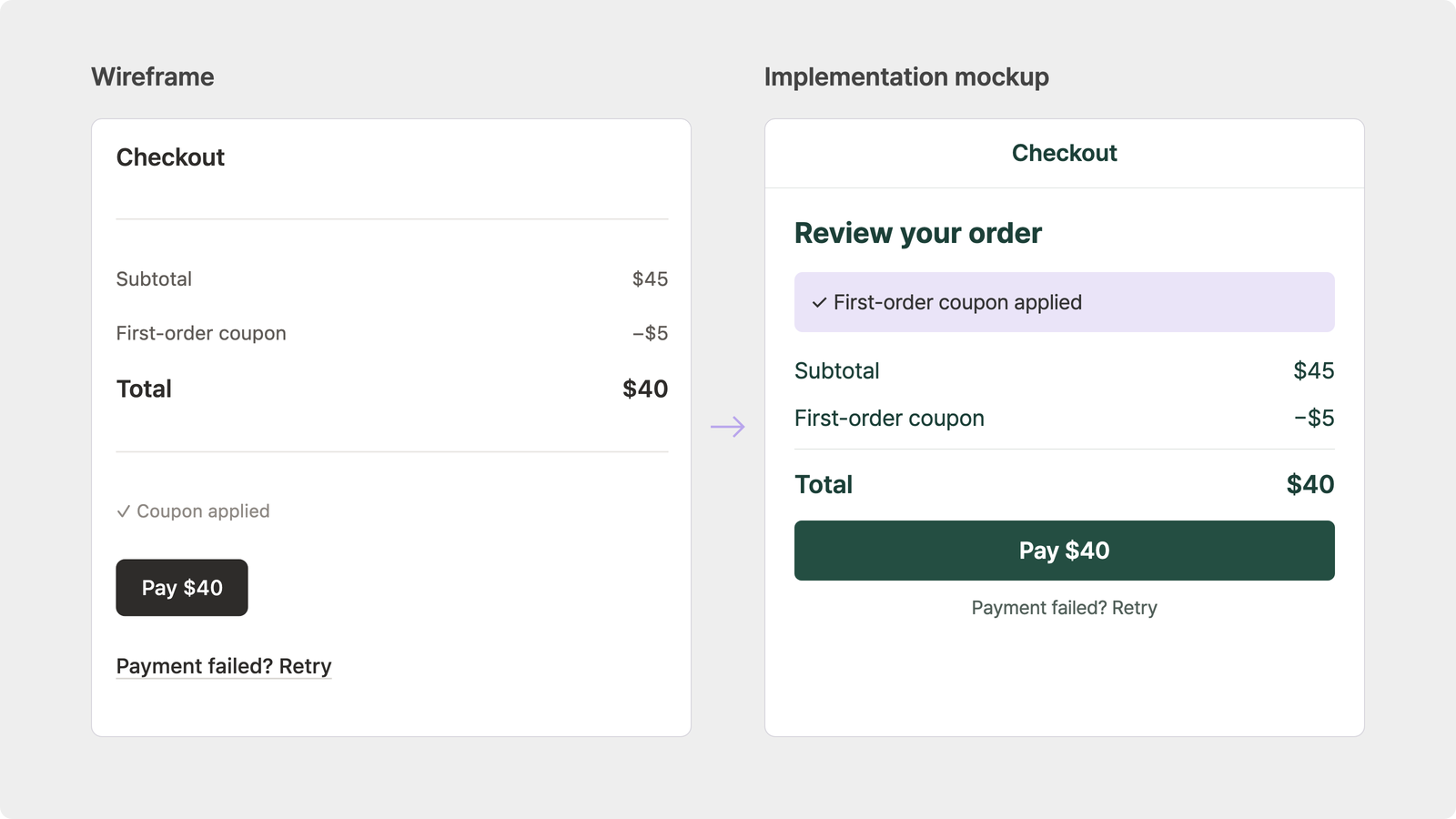
Reviewing an AI draft, recording decisions, and checking them against a working result can then become one continuous process within the same product plan.