The Feature Spec Developers Can’t Help but Love
Why developers still ask questions after reading a thorough spec, and how to capture conditions, actors, actions, outcomes, and acceptance criteria in one feature item.

I used to think a good spec was simply one that was detailed and long.
So as a junior planner, I made my specs as long as I could.
Write the background and goals, build a feature list, paste in a few reference screenshots, and the document grows on its own.
The thicker the document got, the more solid the plan seemed.
I kept writing long specs and quietly assumed I was good at my job.
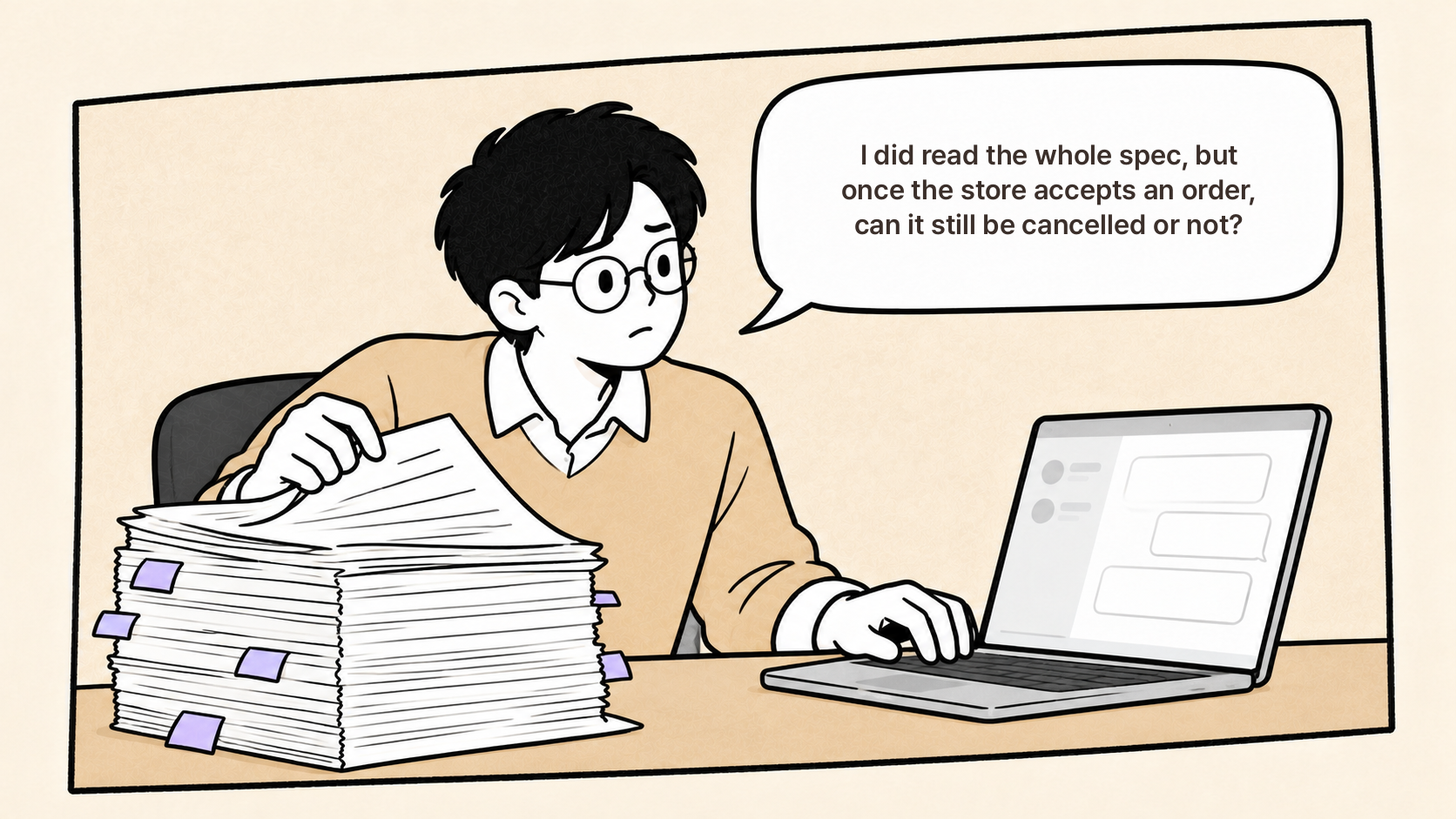
Then, the day before development started, a developer messaged me on Slack.
I read the whole spec, but once the store accepts an order, can it still be cancelled or not?
I needed to reply quickly, but I had no idea what to say, so I opened the spec again.
Reading through it, the feature list did say ‘Cancel order’, but nowhere did it say when cancellation was allowed and when it wasn’t.
The screenshot had a cancel button, but nothing about what happened to the payment or the coupon when you pressed it.
And in all the background and goals, there wasn’t a single sentence a developer could turn into code.
Today, I want to walk through how to turn that one-line feature into sentences a developer can actually build from.
In other words, how to write a feature spec that makes the plan solid
and lets developers work more efficiently.
We’ll follow one feature, order cancellation, all the way through, looking at which fields to fill in and why.
What a feature spec actually records
A feature spec is a document that records, for a single feature, under what conditions, who does what, and what happens as a result.
Compare it with the document that comes right before it, the PRD, and its role becomes clear.
The PRD decides why you are building something and what you are building.
“Customers must be able to cancel their own orders. Cancellation requests make up 30% of support tickets.”
That kind of statement is the PRD’s job.
The same feature reads like this in a feature spec.
Until the store accepts the order, if the customer taps Cancel on the order detail screen,
the payment is fully refunded and the store is notified.
Where the PRD holds the reasoning and scope of a decision,
the feature spec turns that decision into conditions a developer can translate into code.
What matters is that it is not simply a list of features.
Why questions still come back, even from a thorough spec
To start with the cause:
the spec has the ‘what’, but not the ‘when’ and the ‘when not’.
Say a team building a delivery app writes this in their spec.
Feature list: Order cancellation
Priority: High
Screen: Cancel button at the bottom of order details
Written out like this, it looks reasonably well organized.
But if the spec is handed over as is and development begins,
the developer will very likely come back with questions.
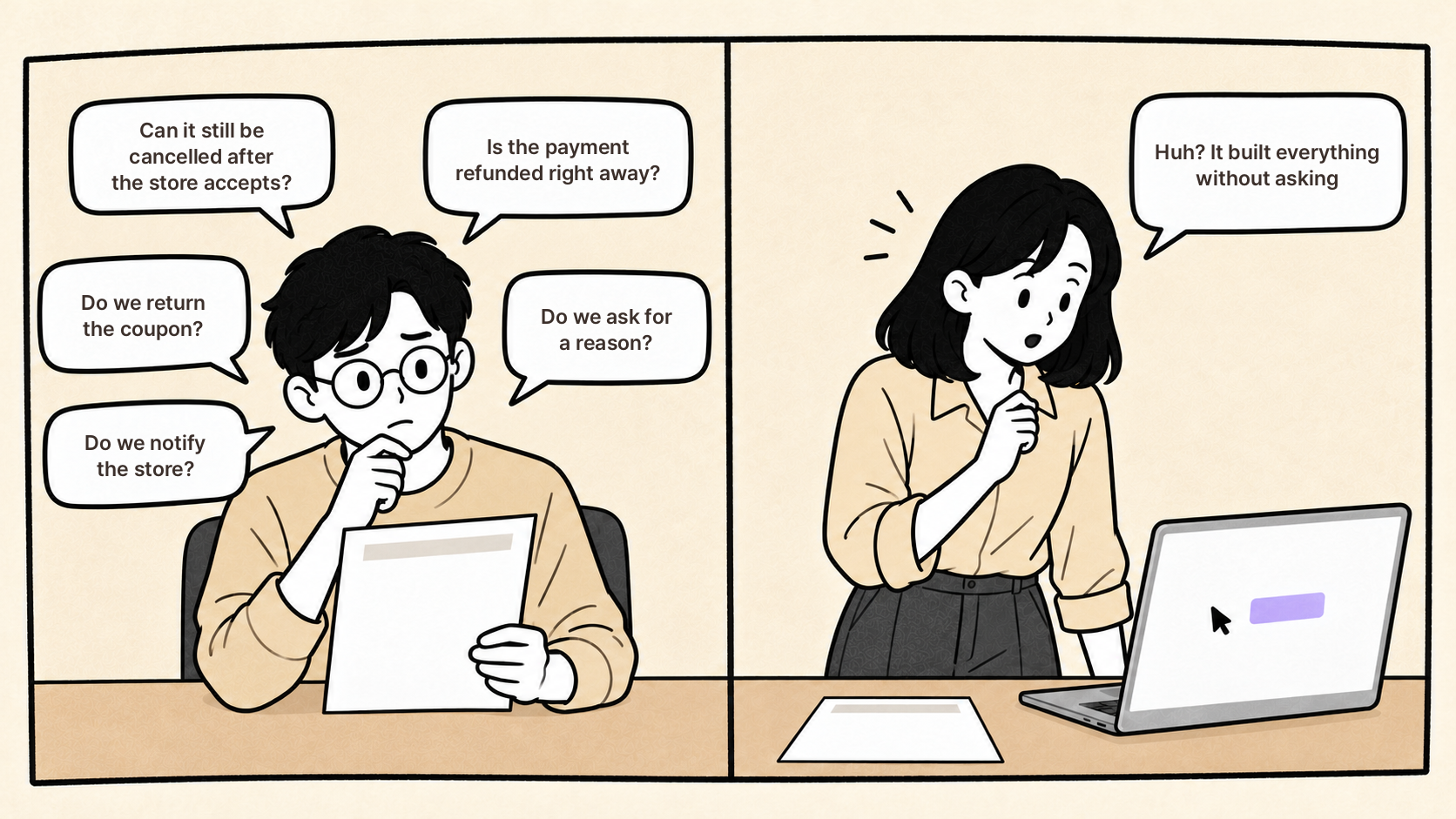
Can it still be cancelled after the store accepts?
Is the payment refunded immediately, or on business days?
If a coupon was used, do we return it?
Do we ask for a cancellation reason?
Do we notify the store?
Keep getting questions like these and the planner starts to get a headache.
But this isn’t because the planner didn’t think about it.
The conditions were in their head; they just never got written down in a form a developer could read.
So what happens if you feed the same spec into an AI coding tool?
Then, the opposite happens: no questions come back at all.
The AI reads the single line ‘order cancellation’ and builds it so that
cancellation works even after acceptance, coupons aren’t restored, and the store isn’t notified.
It decided on its own without asking. Those decisions get caught in QA, or if you’re unlucky, after launch.
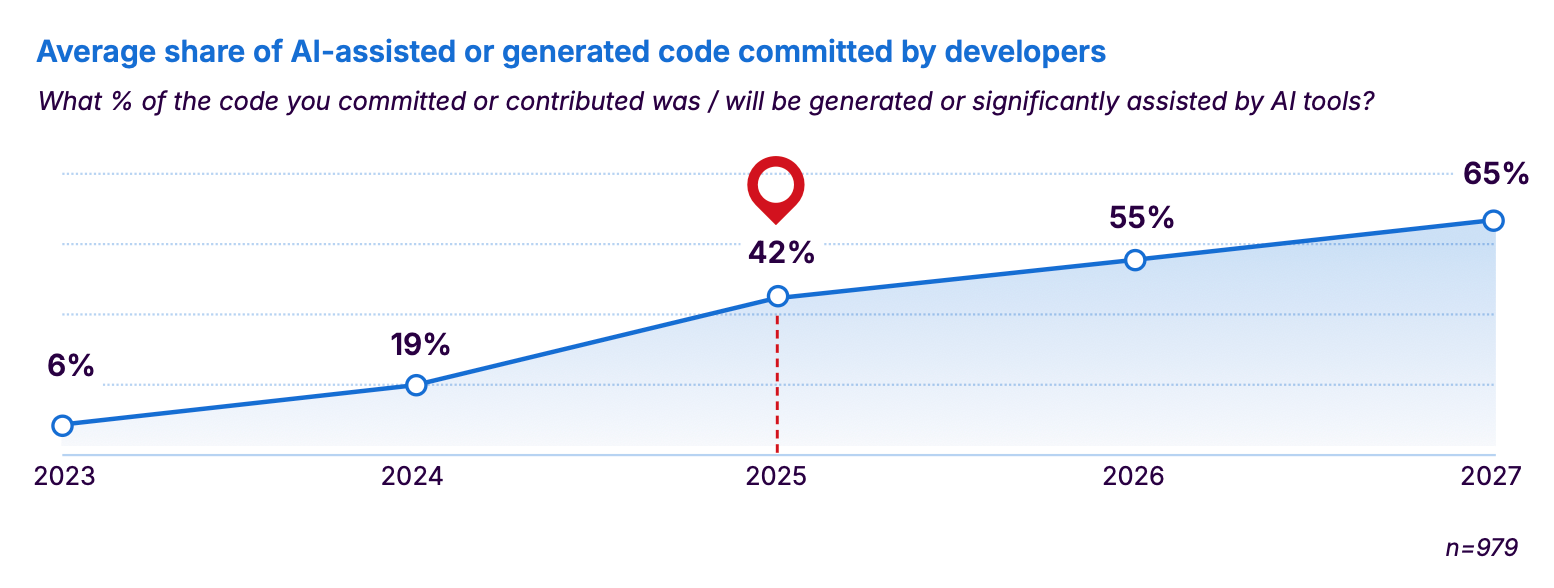
When Sonar surveyed 1,100 developers in January 2026,
they answered that AI already writes 42% of committed code and that this will reach 65% by 2027.
In the same survey, 96% said they don’t fully trust that AI-written code is functionally correct,
and only 48% said they always review it before committing.
<Source: Sonar, State of Code Developer Survey Report 2026, sonarsource.com>
Whether it’s a developer who asks or an AI that doesn’t, someone has to decide the missing conditions.
If the planner doesn’t decide, the developer does. If the developer doesn’t either, the AI does.
A feature spec is the document that makes that ‘someone’ the team.
So what actually changes when you have a feature spec?
First, as I’ve been saying, the number of questions developers have to ask again goes down.
But that isn’t really the big change.
The bigger change is that a sentence the planner writes once gets used by three different parties, as is.
Say the feature spec contains this one line.
If a customer taps Cancel on an order the store has not yet accepted,
the order status changes to ‘Cancelled’ and the payment is fully refunded.
Before starting development, the developer reads this sentence and sizes up the work.
Something like, “If payment cancellation is included, that’s one more task on the payment module.”
If the spec had only said ‘order cancellation’, that remark would have come in the middle of development.
QA (product testing) uses the same sentence as a checklist after development is done.
1. Tap Cancel on an order that hasn’t been accepted
2. Check that the status changed to ‘Cancelled’
3. Check that a refund record was created.
Following the sentence as written is the test, so there’s no need to write separate test cases.
An AI coding tool reads the same sentence and builds exactly that.
‘When, who, does what, what happens’ are all in one sentence, so it doesn’t need to ask.
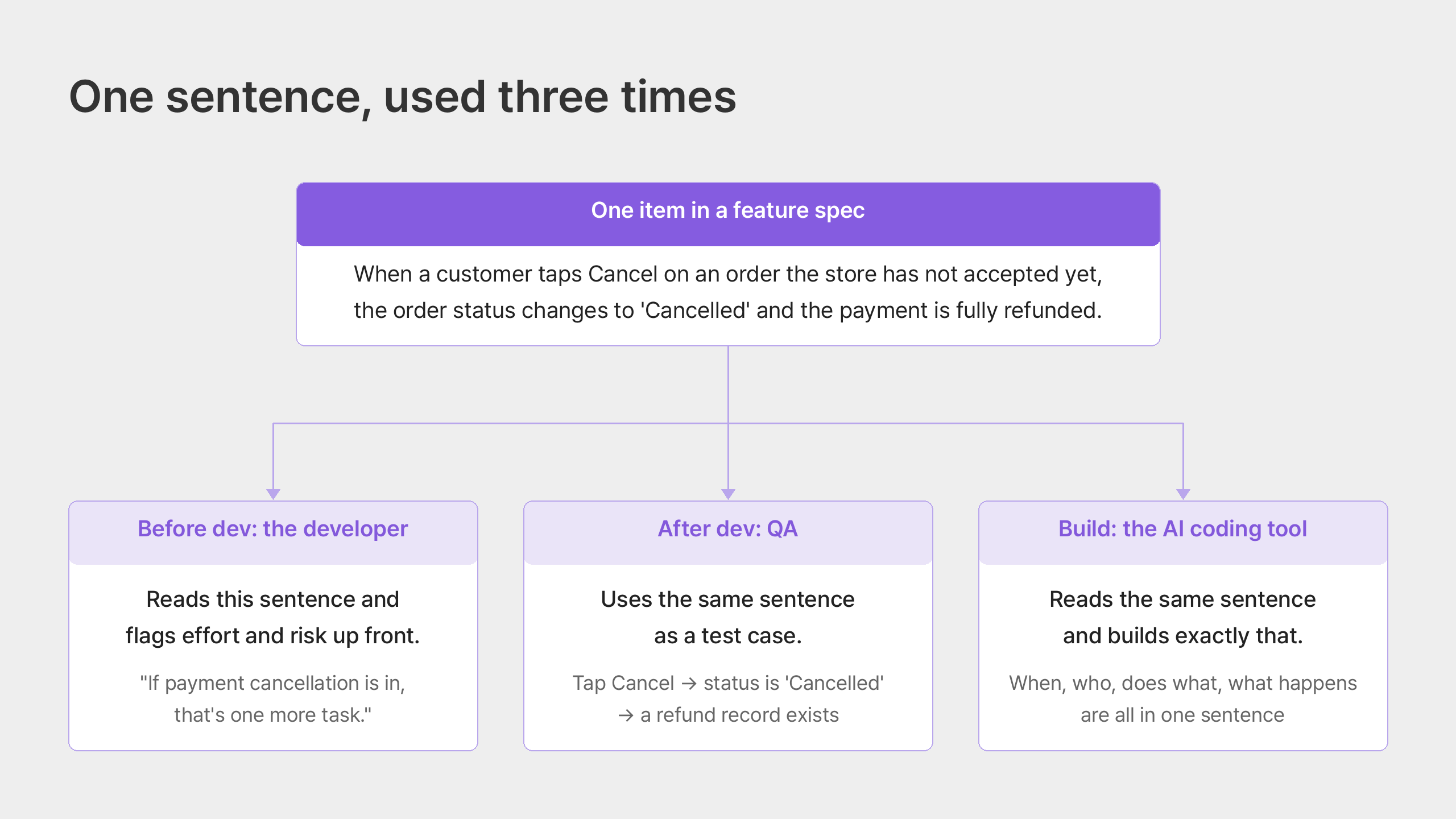
Because a condition written once is used for the explanation before development, the verification after, and the implementation itself,
the planner doesn’t have to say the same thing three times.
The difference between writing a long, thorough spec and writing a feature spec shows up at the sentence level.
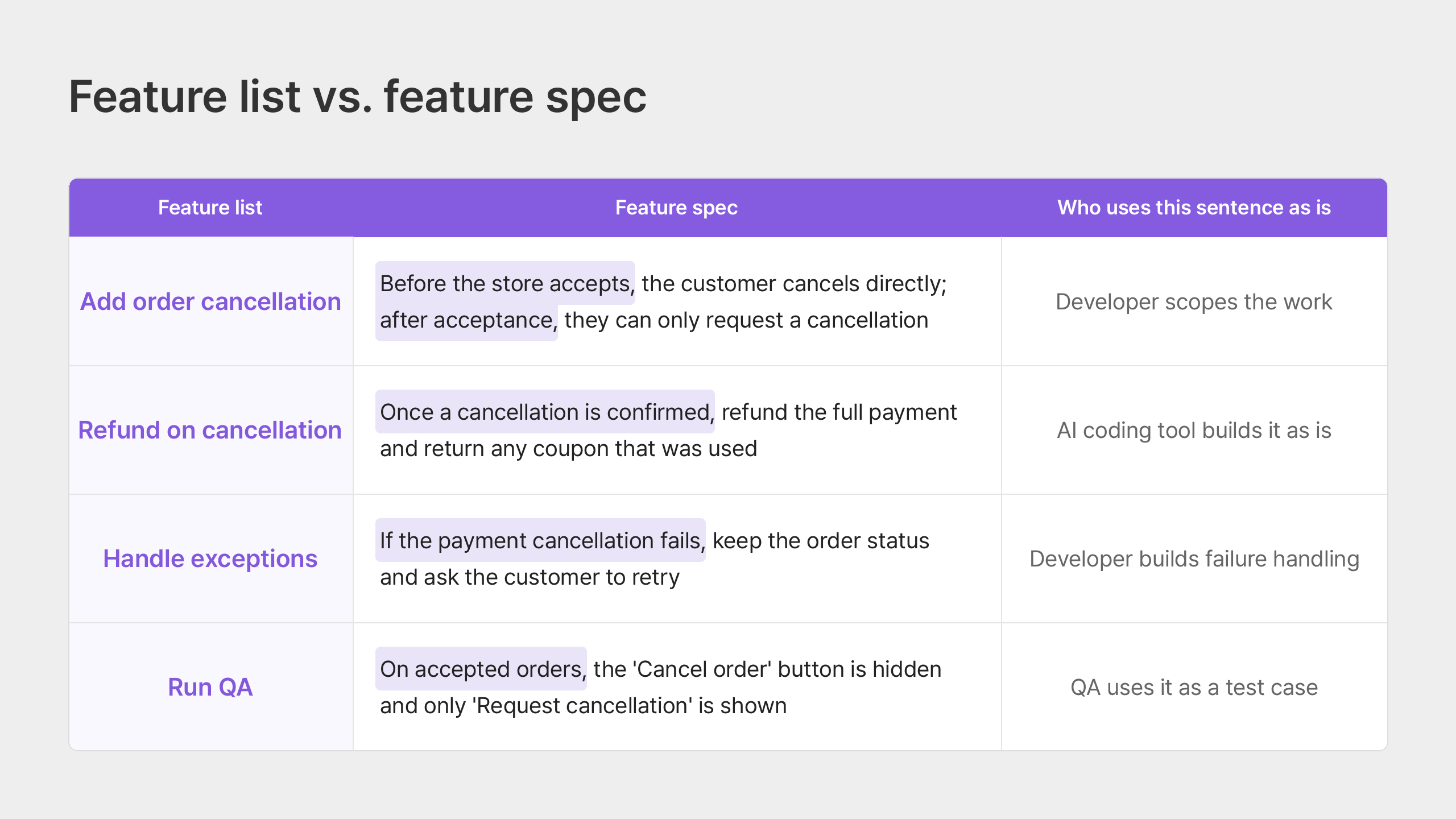
On the left is a feature list; on the right is a feature spec.
The sentences on the right are something a developer can read and build,
QA can verify, and an AI can implement as written.
The five fields that go into one feature item
To sum up, writing a feature spec isn’t about writing a longer spec. It’s a two-step process.
First, split a one-line feature into items. Then fill in the same five fields for each item.
Let me show you what those items are.
[Step 1: Think through the different cases that can happen within one feature.]
The single line ‘order cancellation’ is not one feature; it’s a bundle.
Turn the five questions the developer asked earlier directly into items, and you get this.
Cancel before acceptance: the customer cancels directly
Cancel after acceptance: the customer can only request a cancellation; the store must approve it
Payment refund: once a cancellation is confirmed, refund the full payment
Coupon restoration: once a cancellation is confirmed, return the coupon that was used
Cancellation reason: the customer picks one reason
Store notification: once a cancellation is confirmed, send a notification to the store app
One line became six items.
The questions a developer would ask are the items themselves, so if you write the questions down first, the items come out on their own.
[Step 2: Fill in five fields for each item]
Now take one item and write enough that a developer could build it exactly as written.
There are five things to write.
When, who, does what, what happens, how to verify.
The sentence from earlier, “If a customer taps Cancel on an order the store has not yet accepted,
the order status changes to ‘Cancelled’ and the payment is fully refunded,”
is just these five things joined into a single line.
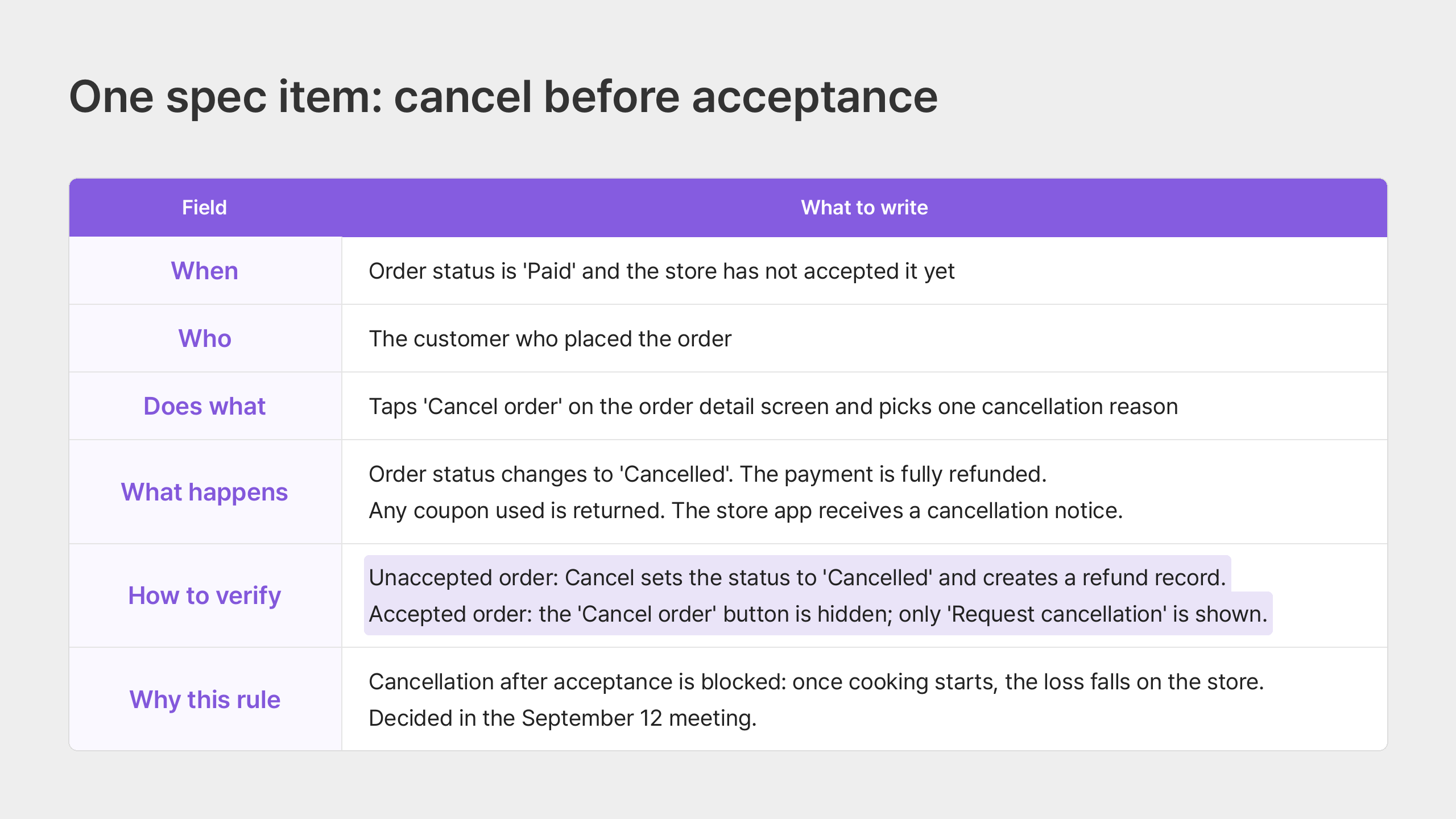
Let’s follow one of the six items, ‘cancel before acceptance’, all the way through.
1. When: the trigger condition
If you only write ‘cancel order’, the developer will build it so every order can be cancelled.
So the first field starts with the condition.
The order status is ‘Paid’ and the store has not yet accepted it.
With this one line, “Does it work after acceptance too?” disappears.
After acceptance is handled by a separate ‘cancellation request’ item.
2. Who: the actor
The customer who placed the order.
A short field, but a big one if it’s missing.
This is where it’s decided whether the store owner can cancel too, or a customer service agent.
This item covers only the customer; store and agent cancellations go in separate items.
3. Does what: the user’s action
Taps ‘Cancel order’ on the order detail screen and picks one cancellation reason.
The answer to “Do we ask for a reason?” is right here.
We ask, it’s required, and only one can be chosen. Three decisions in one sentence.
4. What happens: the result
The order status changes to ‘Cancelled’.
The payment is fully refunded.
The coupon that was used is returned.
A cancellation notification is sent to the store app.
Write results one per sentence.
“Do we return the coupon?” and “Do we notify the store?” disappear here,
and an AI coding tool reads four things as four things.
5. How to verify: the completion criteria
This is the field most often left empty.
On an order that hasn’t been accepted, tapping Cancel changes the status to ‘Cancelled’ and creates a refund record.
On an accepted order, the ‘Cancel order’ button is hidden and only the ‘Request cancellation’ button is shown.
With these two lines, the developer only has to build until this state is reached,
and QA can use the same two lines as the checklist.
Without them, it ends with everyone asking each other, “This is good enough, right?”
One more: why we decided this
It helps to add one more field next to the five.
Cancellation after acceptance is blocked because once cooking has started,
the loss falls on the store. Decided in the September 12 meeting.
This field is for the next person who reads it, more than for the person building it now.
When the owner changes, “Why was it done this way?” doesn’t come back,
and when a condition changes (say the platform decides to cover the store’s loss),
you can see right away which decision needs revisiting.
So how far should you go?
If you’ve read this far, you’re probably thinking,
“Wait, do I really have to break down every single feature like this?”
Instead of thinking that way, set one rule for yourself.
Write down only the decisions you can’t leave to the developer or the AI.
Whether the cancel button is red, or whether a confirmation popup appears, doesn’t need to be written down.
That’s the designer’s and developer’s call, and if it’s wrong, it’s cheap to fix.
But what happens when the payment refund fails does need to be written down.
AI tends to assume that case “succeeded” and move on.
If you don’t know which item to start with, begin with three questions.
“When does this feature not work?”
“If I don’t decide this, who ends up deciding it?”
“How will I know it’s done?”
And if you still don’t know where to begin,
pick one feature and start by writing down ‘things that could go wrong while using this feature’.
After acceptance, payment failure, already out for delivery, and so on.
As you write down the cases where it doesn’t work, the conditions you need to write will come out on their own.
If you’ve made it this far,
your feature spec is ready to move up a level.
But there’s one more problem to think about.
Where the conditions are scattered
The problem is that when you actually try to fill in the fields,
the conditions and policies are most likely not in one place.
For example, the cancellation rule is in a meeting note, the refund policy is in the CS manual,
and whether coupons are restored is somewhere in last quarter’s Slack.
In this state, if you dump all the files into an AI
and say “read everything and write me a feature spec,” you’ll get a plausible-looking table.
The problem is that the AI fills the empty fields with defaults,
and you only find out those defaults differ from the team’s decisions after development is done.
That’s why the order matters.
Before you let the AI draw the table, the team looks at the empty fields first.
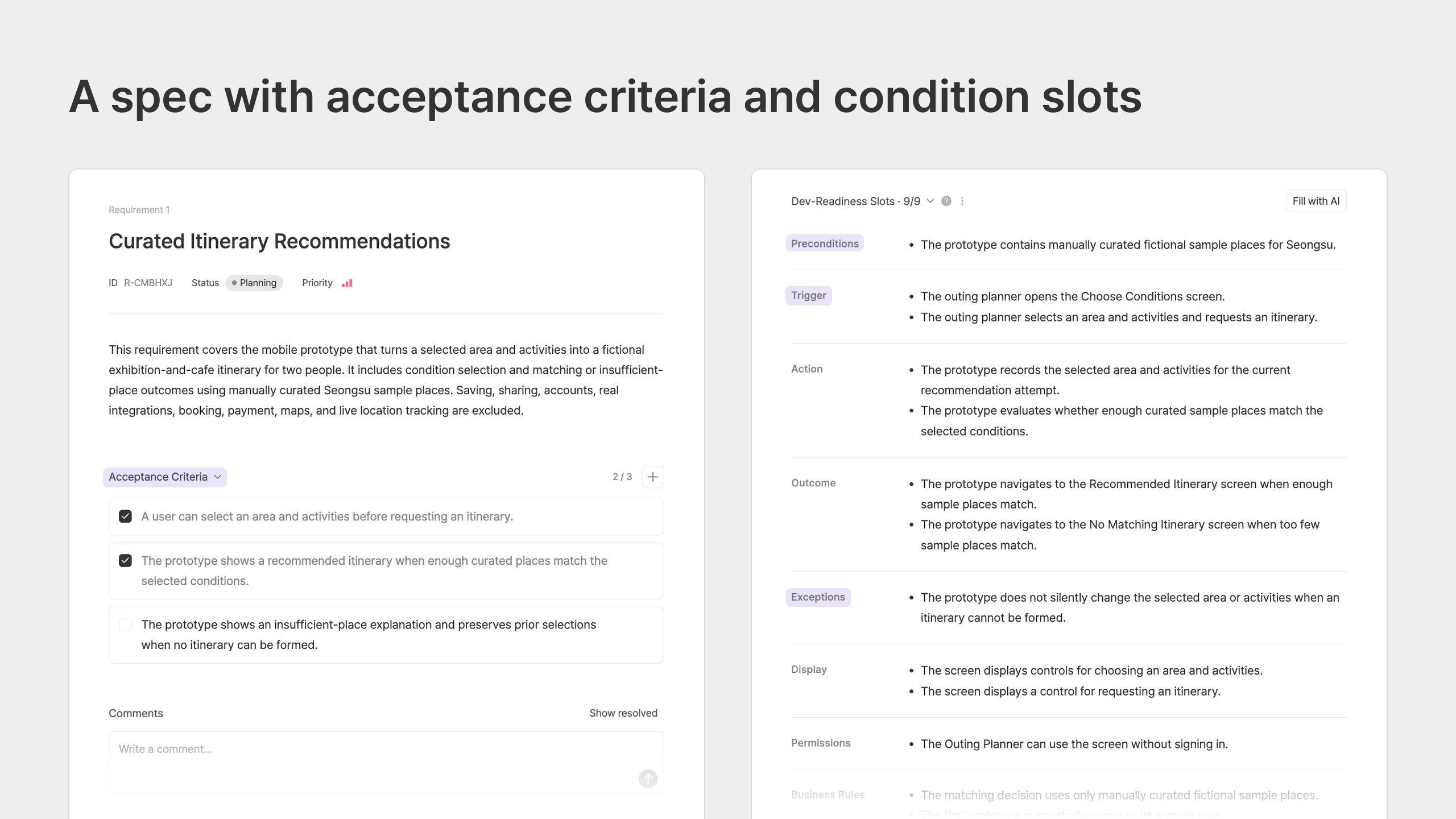
Manyfast is a tool that builds specs in this order.
The scope set in the PRD carries into the items of the feature spec,
the AI asks about the empty conditions in each item first, and the team decides the answers.
The completed document carries the same conditions through to the user flow and wireframes,
and AI coding tools like Cursor or Claude Code read it as is.
Of course, it doesn’t decide the conditions for you.
Whether to block cancellation after acceptance is still the team’s decision.
What changes is that the question comes before development, not after it’s done.
Wrapping up
A feature spec is not about writing a longer spec.
It’s about turning the conditions the team has decided into sentences that developers and AI can build from without asking again.
What you can do today is small.
Pick one one-line feature from your spec, write down the five questions a developer would ask,
and move those questions into when, who, does what, what happens, how to verify.
Then check just one thing.
Who is deciding the conditions in your spec right now?
Conditions the planner doesn’t decide get decided by the developer, and if the developer doesn’t either, the AI does.
If you have a spec but the developer’s questions aren’t going away,
try moving those questions into the first field of a feature spec.