Six AI PRD Tools Compared Using the Same Product Brief
We tried the same product brief in six AI tools and compared their drafts, open questions, and the work that comes next.
What a PRD is and what belongs in it
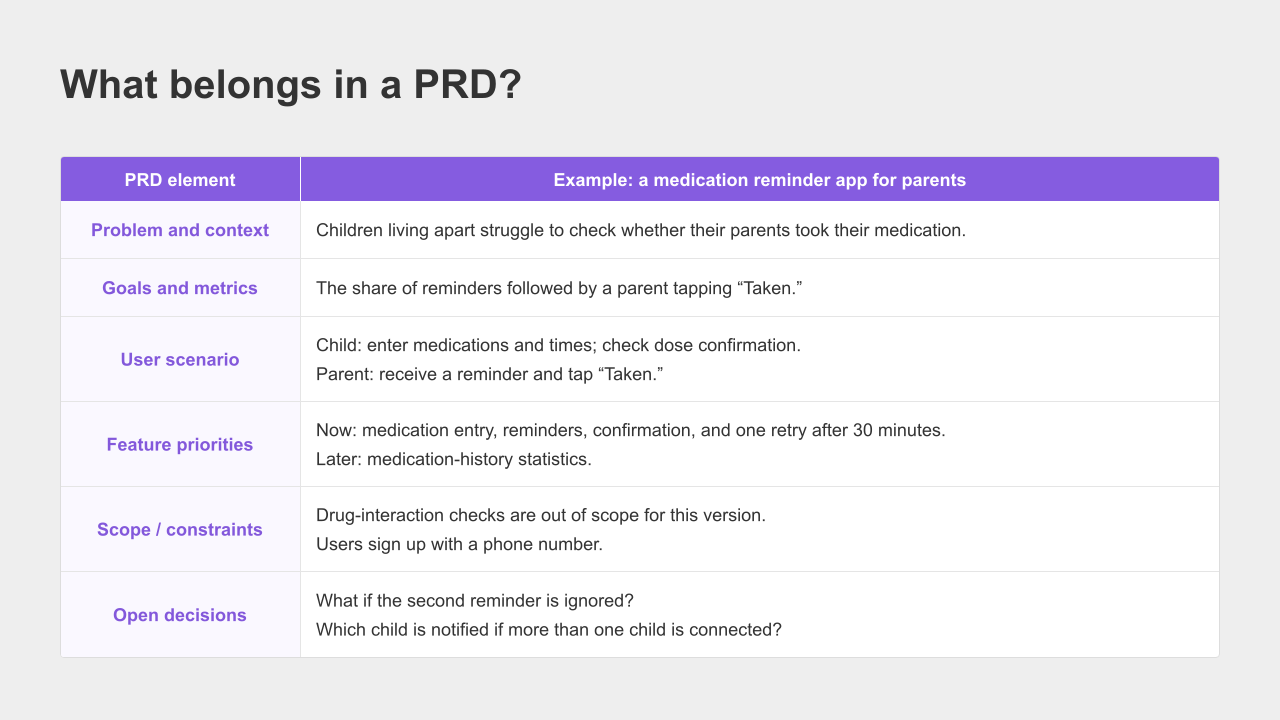
A PRD, or Product Requirements Document, explains what you are building, who it is for, why it is needed, and what the current version will include.
If you have never written one, start with four things:
The person whose problem you want to solve, and the problem they face.
The features you need now, and those you can leave for later.
What should happen when a user takes an action.
The decisions you have not made yet.
Consider an app that lets adult children check whether their parents have taken their medication.
“Send a reminder when it is time to take a pill” describes a feature, but leaves out the audience, the measure of success, and the scope of the first release.
For this example, we organized the brief into six areas: the problem, goals, user scenarios, feature priorities, constraints, and open questions.
You do not need those exact headings. You do need to make the decisions visible before moving on.
The brief we used across all six tools
We gave ChatGPT, Claude, ChatPRD, WriteMyPRD, UX Pilot, and Manyfast the same product description.
The brief below is an English translation of the Korean input used in our test:
I want to build a medication reminder app for parents.
An adult child enters the names of their parent's medications and the times they should be taken.
The parent receives a notification on their phone at each scheduled time.
When the parent taps “Taken,” the child can see the confirmation on their own phone. I
f the parent does not tap it, send one more reminder after 30 minutes. Users sign up with a phone number.
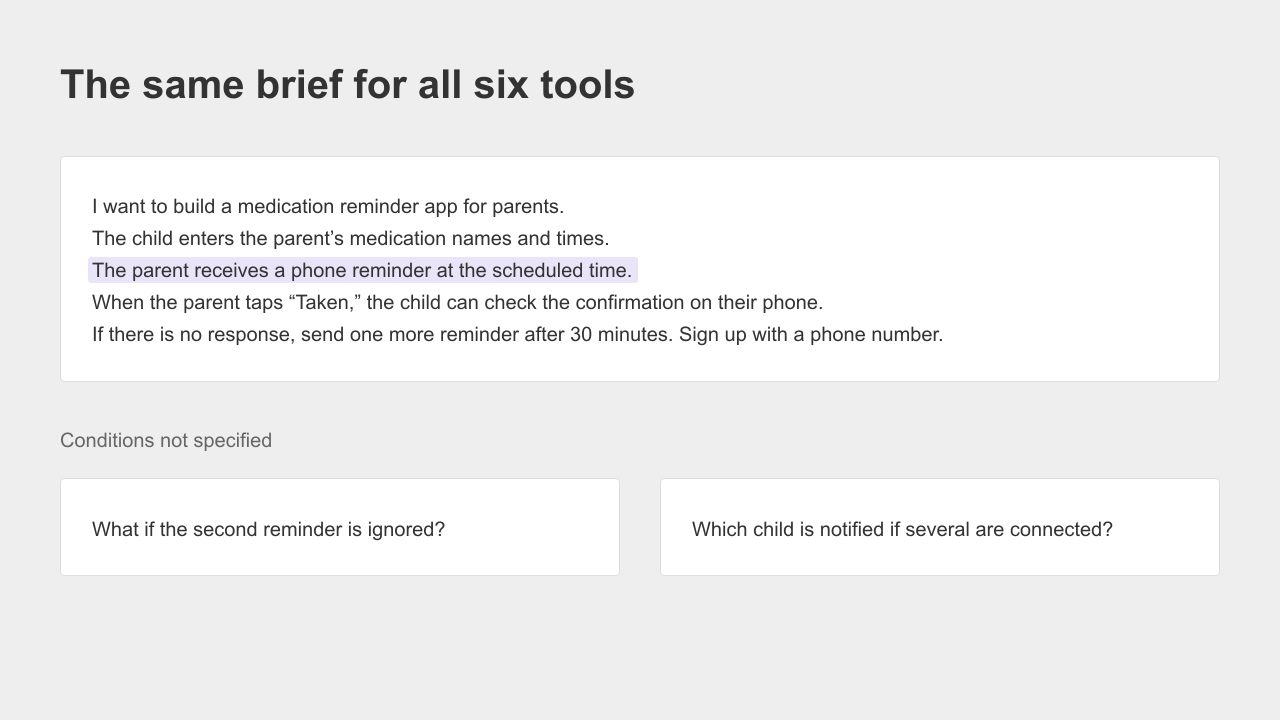
We deliberately left two decisions out. What happens if the parent does not respond to the second reminder? And what happens when more than one adult child is involved?
For each tool, we looked at what we had to enter before receiving a result, what the tool produced, and how it handled those unanswered questions.
ChatGPT and Claude received one additional instruction: “Leave undecided details as questions.” For the other four tools, we followed their input forms or prompts.
This was a practical comparison of six workflows, not a controlled benchmark of their underlying models.
The results describe these particular attempts, not everything each product can do.
The editorial visuals translate the Korean examples into English. The UX Pilot image uses an English revision of the dashboard.
These are illustrations of the documented workflows, not a new six-tool English benchmark.
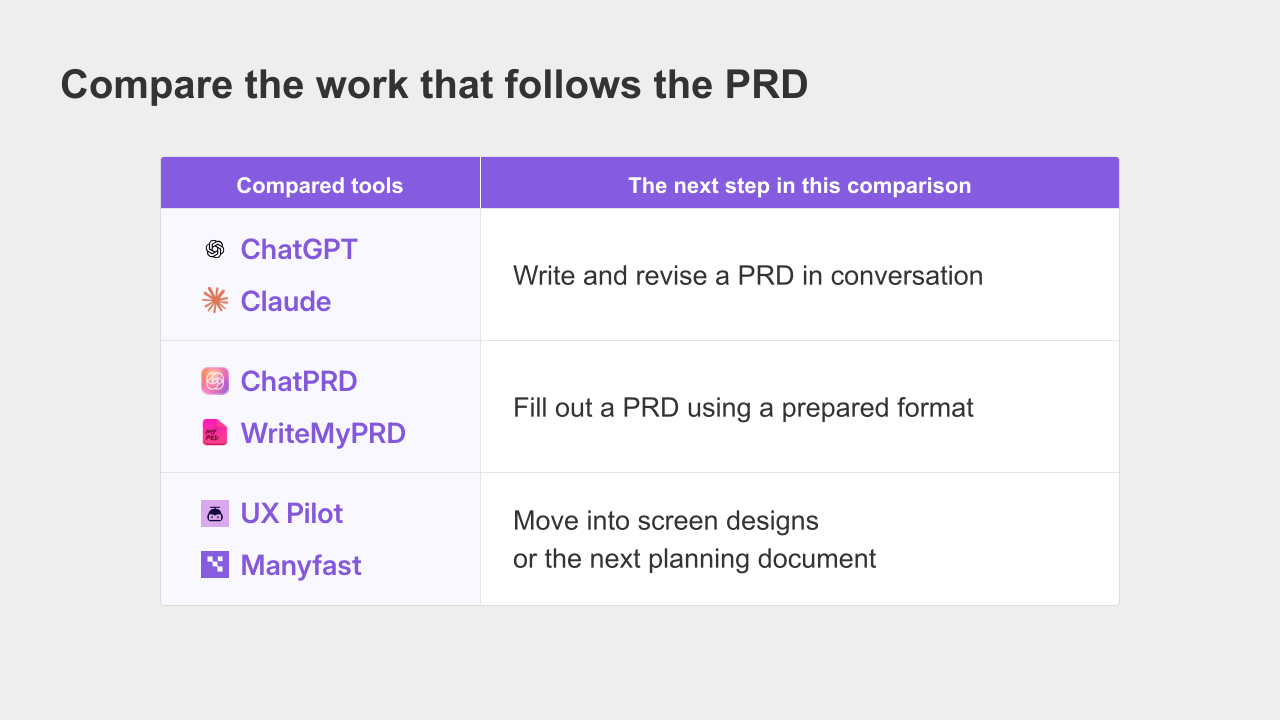
In our comparison, ChatGPT and Claude let us draft and revise through conversation.
ChatPRD and WriteMyPRD gave us a starting structure. UX Pilot produced a screen design, while Manyfast let us continue into feature specifications, user flows, and wireframes in the same project.
When the AI you already use is enough
ChatGPT
We added this instruction to the brief in ChatGPT: “Write this as a PRD. Do not fill in details we have not decided. Leave them as questions.”
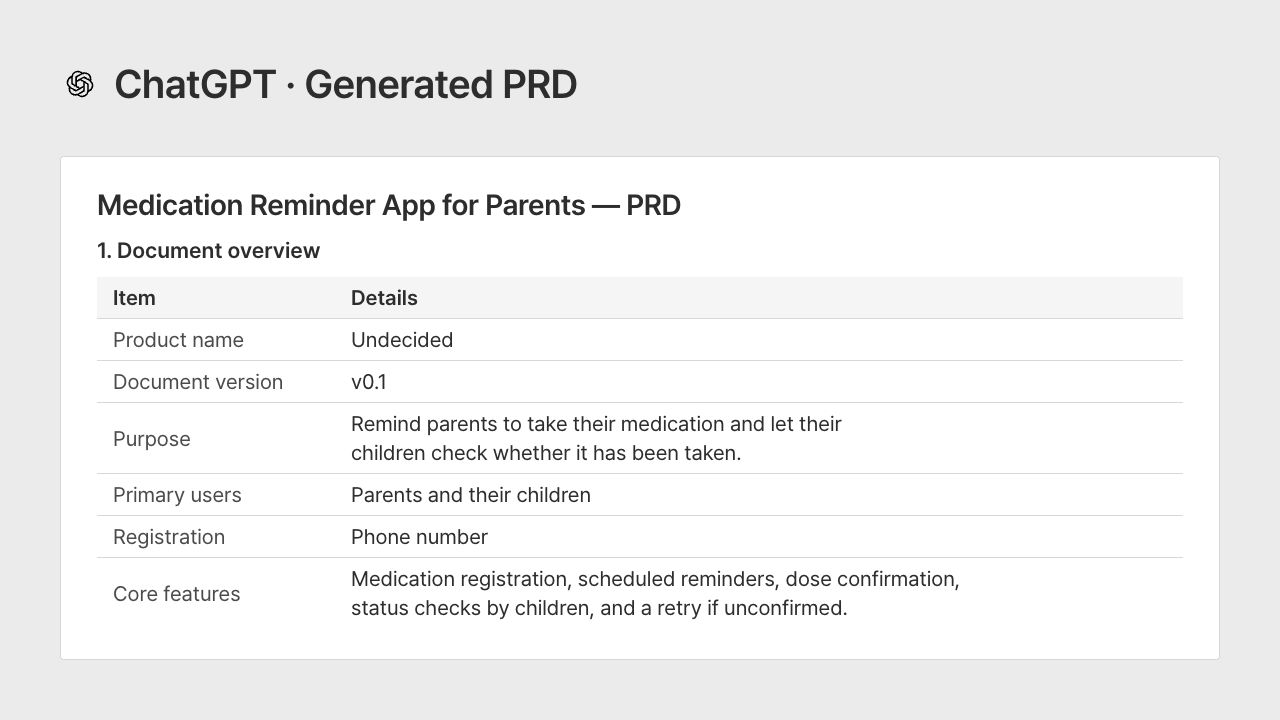
In this test, ChatGPT turned the brief into a PRD draft with 19 sections.
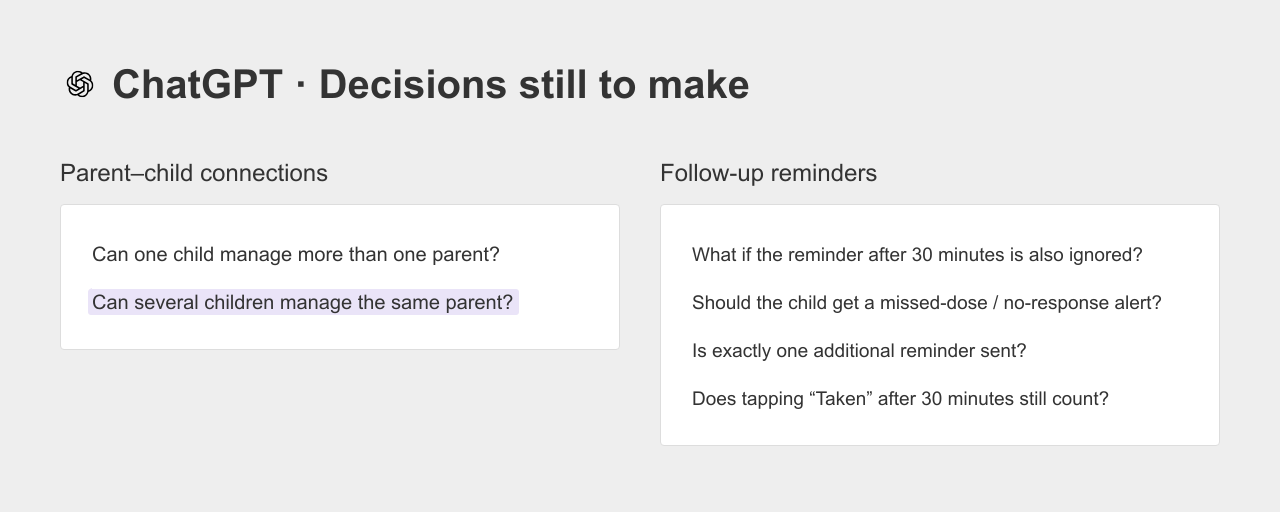
Under reminders, it asked what should happen if the parent still did not respond after 30 minutes.
Under account connections, it asked whether several adult children could manage the same parent.
It caught both decisions we had intentionally left open and collected 16 questions at the end.
We could answer those questions and ask ChatGPT to revise the document.
For this workflow, we still had to decide where the team would review the PRD and how to keep that copy up to date.
We also needed follow-up requests to work through individual feature rules and screens.
Claude
We gave Claude the same brief and the same additional instruction.
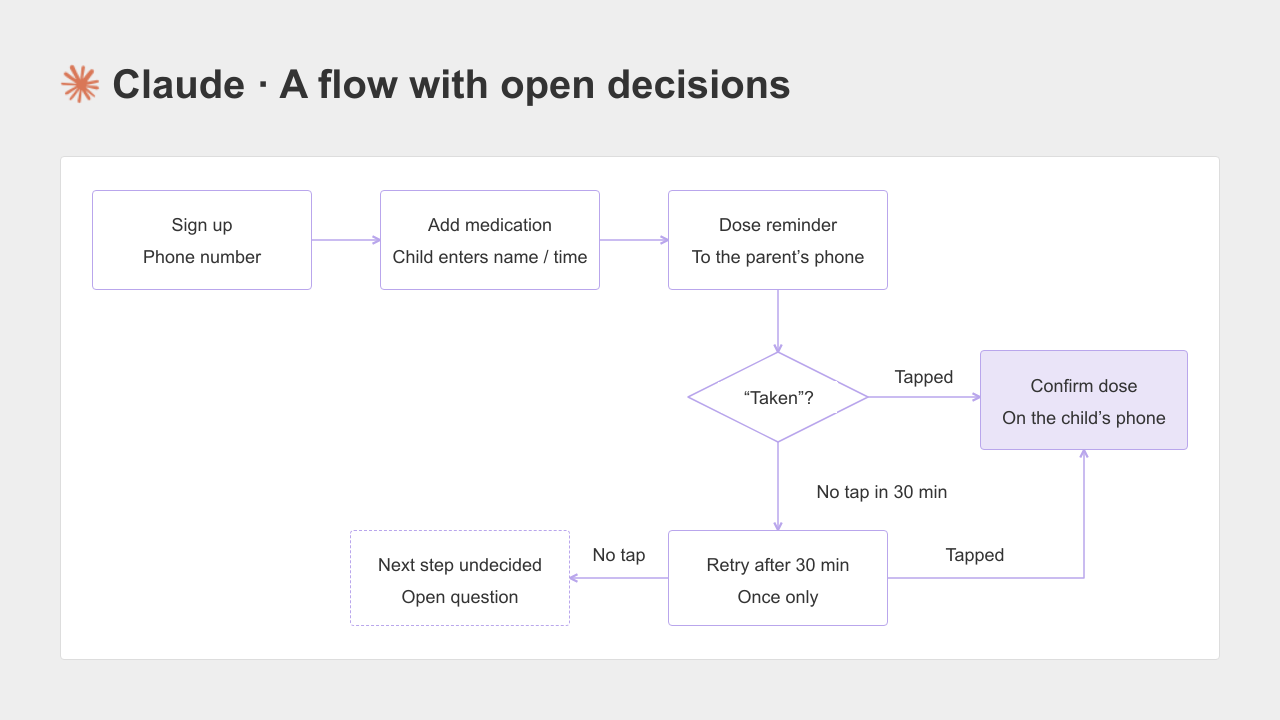
Claude also left both missing decisions as questions.
Its flowchart marked the branch after an unanswered second reminder with a dashed box labeled “Next action undecided.”
It listed 26 open questions and linked each one to the relevant requirement.
We still needed to choose how to share and maintain the document for our team.
One attempt was not enough to declare either tool better, but both responded well to the explicit request to preserve open questions.
You do not need to bring a complete template to either tool; you can ask it to suggest one.
Still, if you would rather start with a product-document template already in place, the next two tools are worth a look.
When you want a structure to start from
ChatPRD
ChatPRD is built for product work, with templates for PRDs and user stories.
A user story is a short description of who needs a feature and what they want to do with it. Teams can also use their own templates.
Its scope extends beyond drafting PRDs. In short, it helps you turn your product idea into a structured PRD.
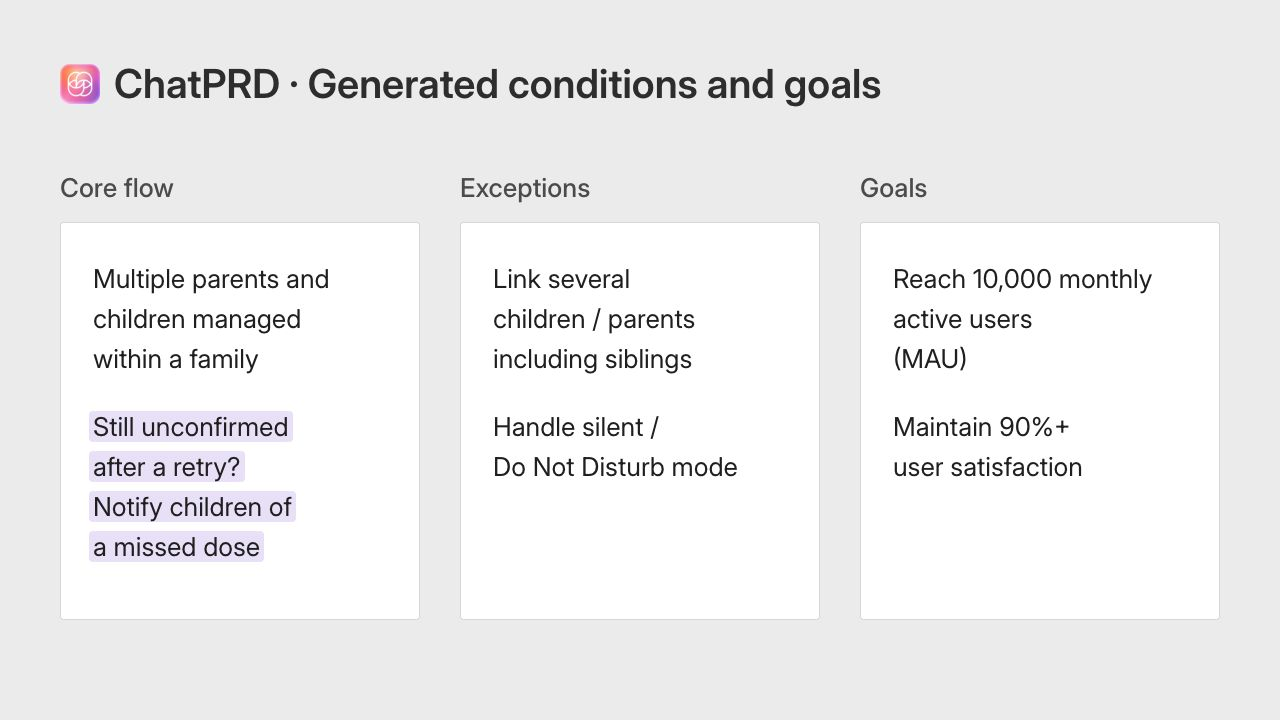
We appended “Write a PRD from this” to the shared brief. ChatPRD asked which template to use.
After we chose the default, it produced a document with goals, user stories, core flows, success metrics, and a timeline.
It filled in both missing decisions without asking us first. The flow included notifying the child if the parent did not respond to the additional reminder.
The exceptions included connections between multiple children and parents. It also added targets of 10,000 monthly active users and at least 90% user satisfaction.
That made the document easy to scan, but those rules and targets were AI proposals, not decisions we had made. We would need to review them before sharing the PRD as an agreed plan.
WriteMyPRD
WriteMyPRD used a form rather than a conversation in our test.
The fields asked for a product name, feature name, overview, feature list, and user feedback.
Even before generating anything, the form showed what information to prepare.
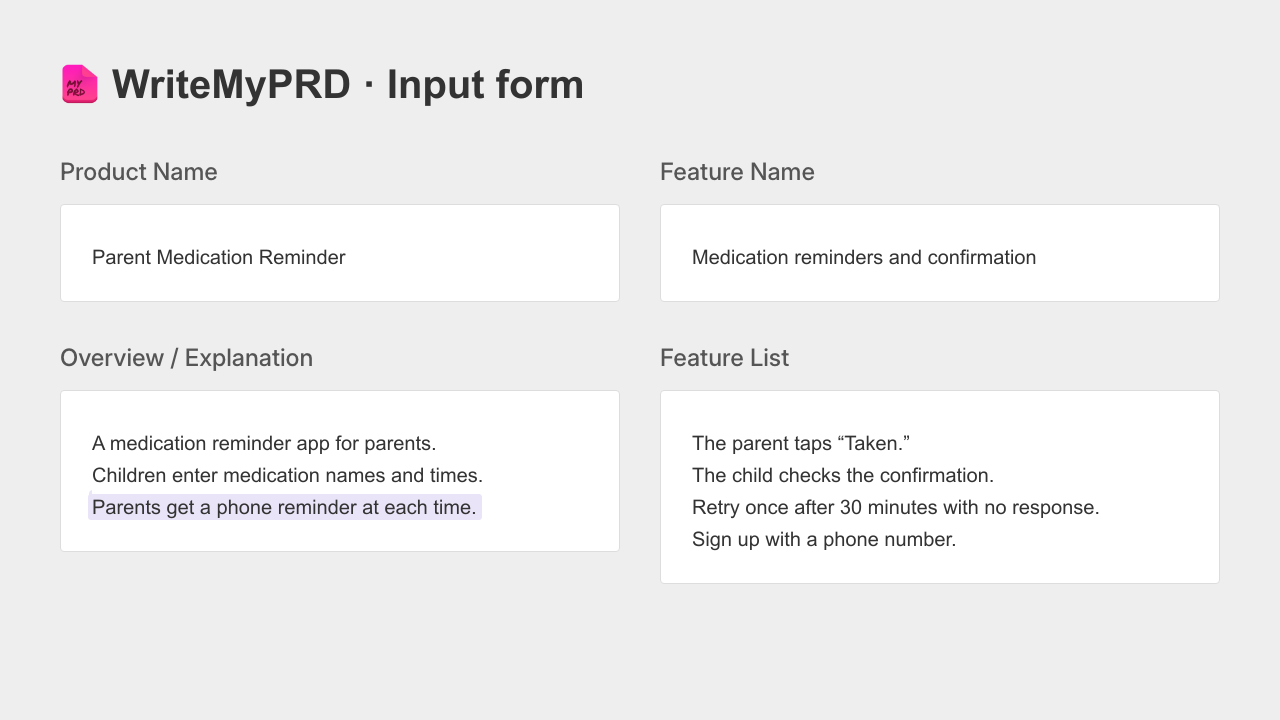
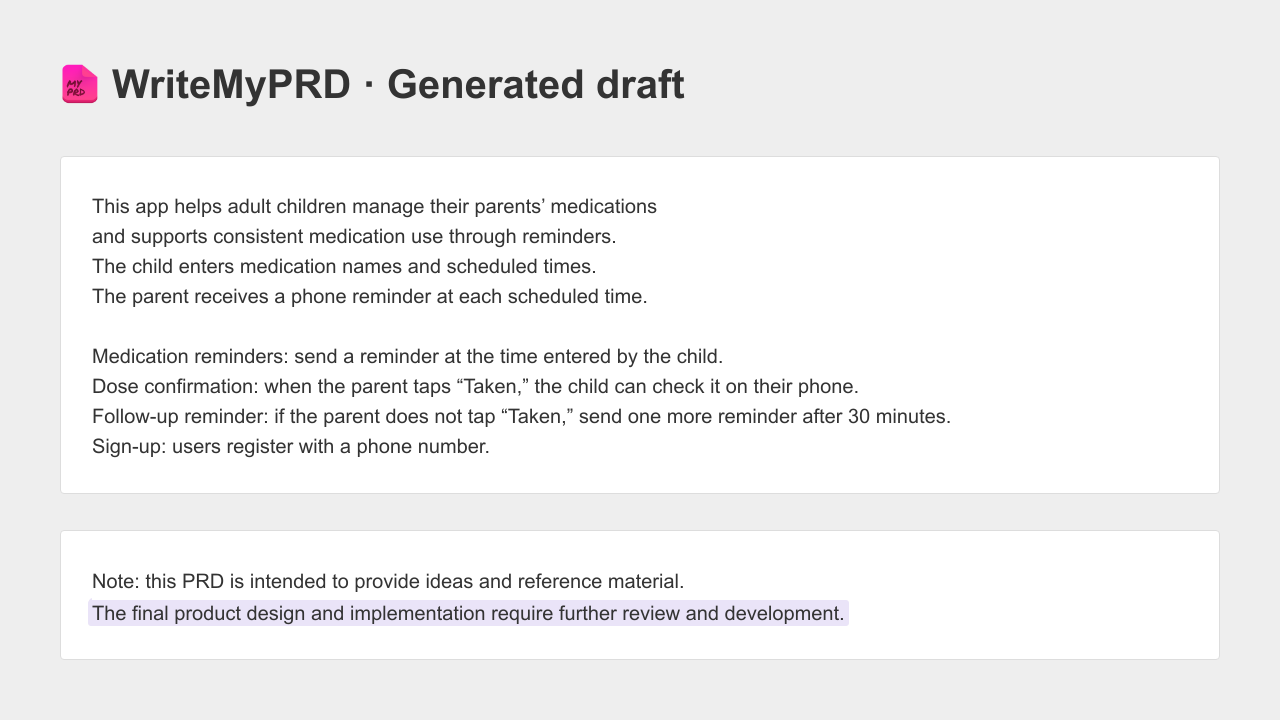
After we filled in the fields, it returned a short, one-page draft with an overview, four features, and feature descriptions. A “Note” called out details that still needed a human decision.
A structured document is a useful start. It does not necessarily make the interface easy to picture. What will the child see after the parent taps “Taken”? We wanted to look at that next.
When you need to work beyond the PRD
UX Pilot
UX Pilot connects product descriptions to requirements and interface designs. Its official PRD generator page describes creating PRDs and screens, refining them with follow-up prompts, and exporting designs to Figma or HTML.
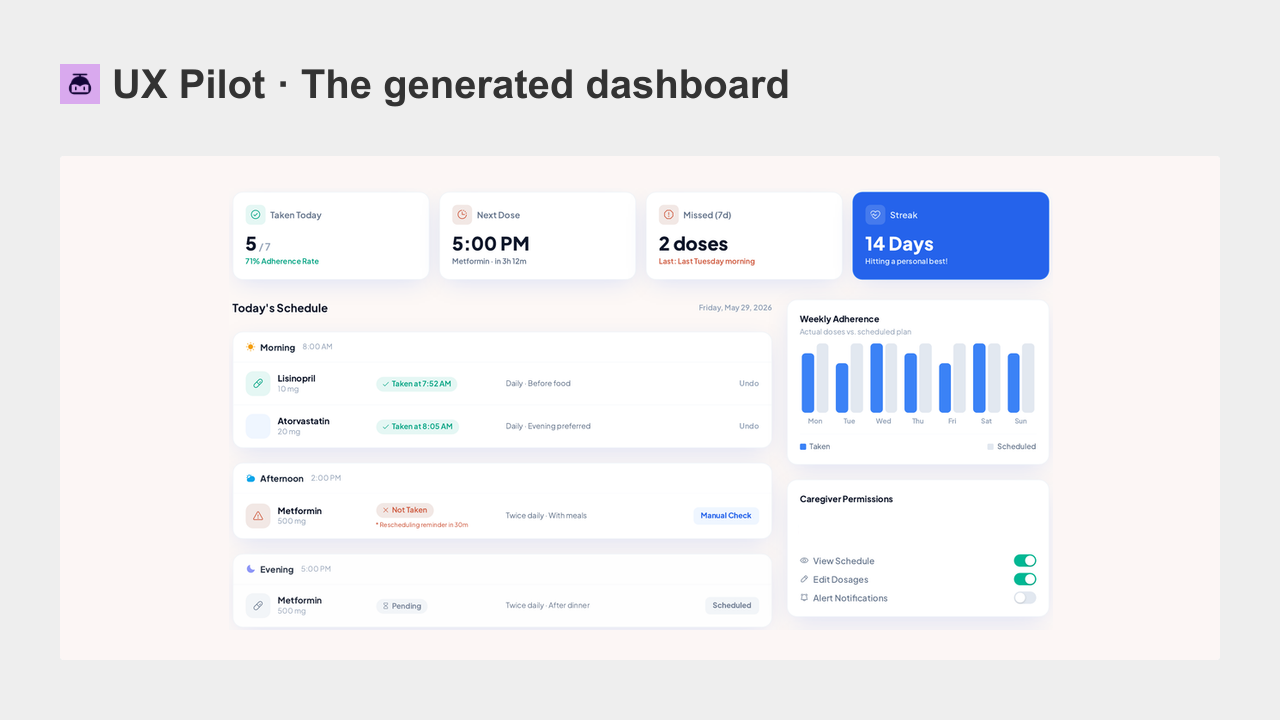
When we entered the shared brief on its AI PRD Generator page, the first result was a caregiver dashboard rather than a text PRD.
The screen included a weekly medication adherence chart, caregiver permissions, and refill reminders. None of those appeared in our original brief.
A screen gives teammates something concrete to discuss. Before handing it over, though, we would need to separate the features we requested from the features the AI added.
A polished layout does not tell you which decisions have been agreed.
The next question is how to manage a change. If the team decides to shorten the reminder interval to 10 minutes, which requirements and screens need updating?
UX Pilot's official page describes iterating on both; we did not test that change workflow in this comparison.
Manyfast
Manyfast is a collaborative workspace for software product planning. We entered the shared brief using the option to start with questions.
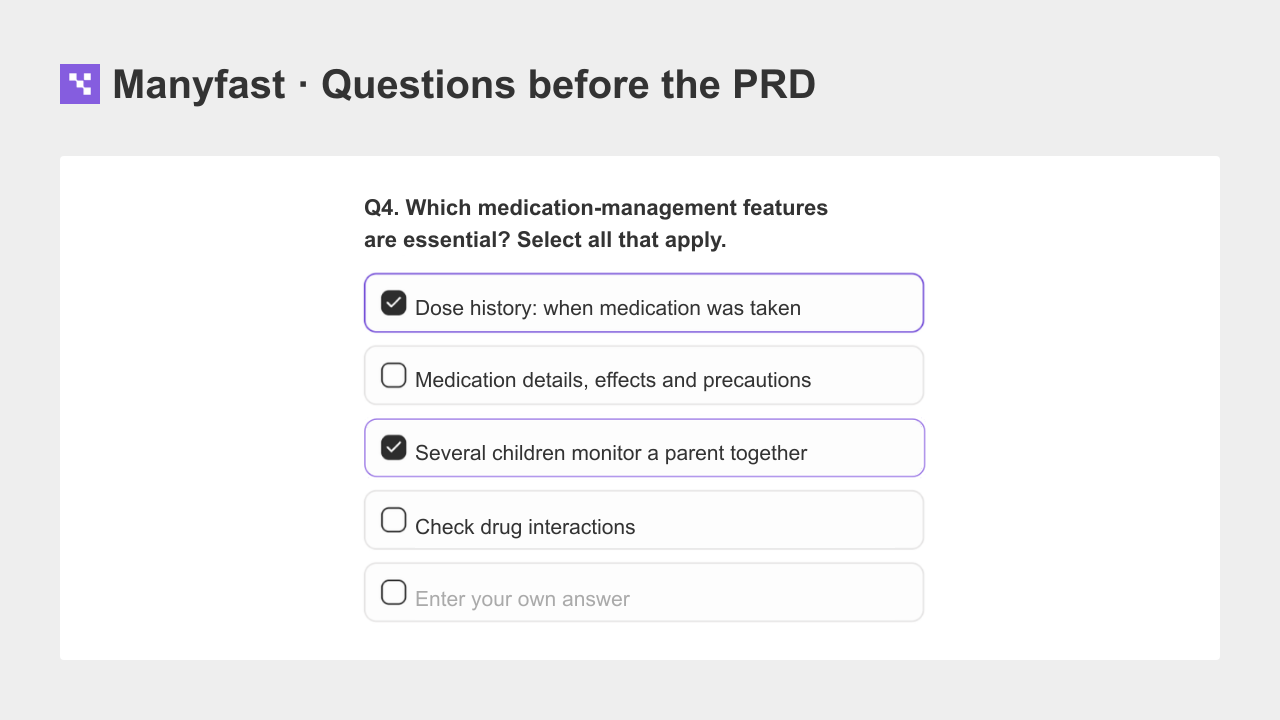
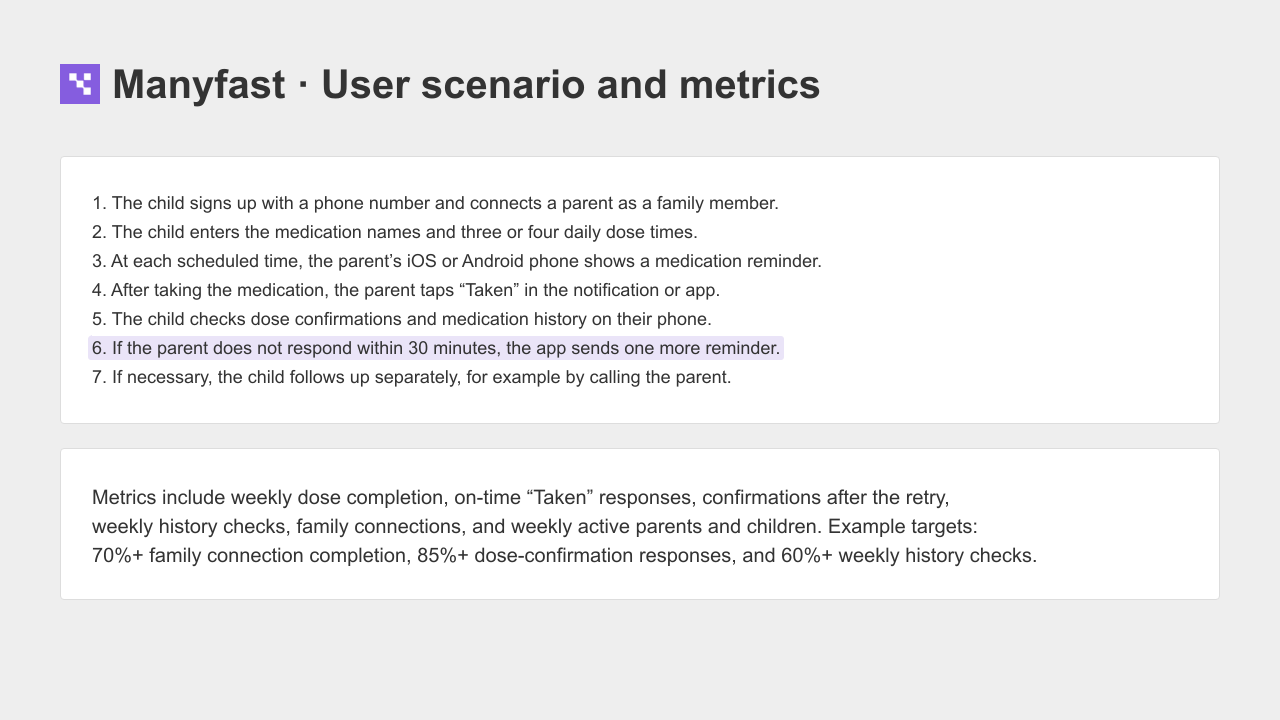
Before drafting the PRD, it asked six multiple-choice questions. One option in the fourth question was for several adult children to monitor a parent together.
That surfaced one of the two decisions we had left open.
After we selected the answers, the PRD organized the idea into sections covering the overview, problem and solution, target users and scenarios, success criteria, risks, and project settings.
It did not ask about the other missing decision. Instead, its user scenario said the child could check the unanswered reminder and call the parent if needed.
It also included an 85% response rate, explicitly labeled as an example initial target. Those still needed our review.
We could then continue into feature specifications, user flows, and wireframes within the same project. AI-proposed features needed human approval before becoming confirmed items. The useful distinction was where those decisions could be reviewed and developed further, rather than whether the initial PRD contained assumptions. It did.
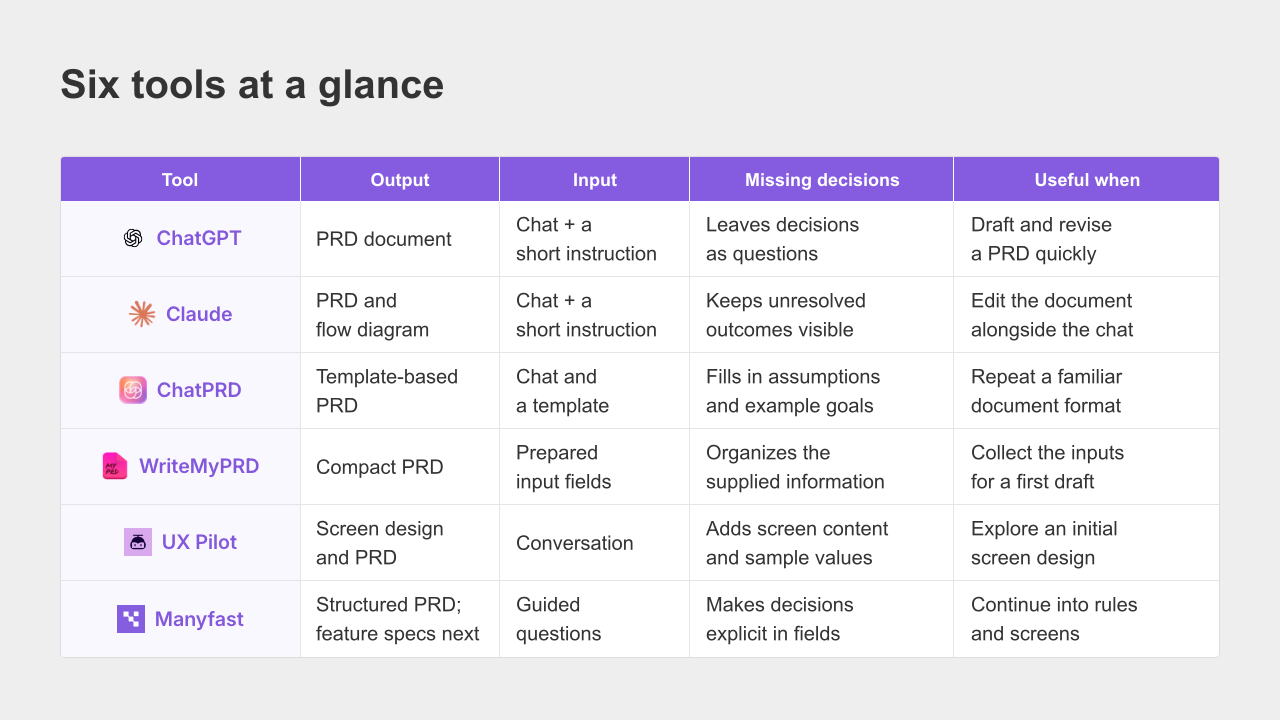
The six tools at a glance
This is a summary of the workflows we tried, not a ranking. Start with the last column and look for the task you need to complete.
Frequently asked questions
How is an AI PRD tool different from ChatGPT
If you need a first PRD draft, ChatGPT may be enough. In our test, asking it to leave undecided details as questions helped it identify both gaps. Specialized tools offer different ways to organize and continue the work. Some start with templates; others place requirements, screens, reviews, or handoff tools in a product workspace. Compare the next task you need to complete, not just the first document.
Where can I find a PRD template
You can start with the four areas at the beginning of this article: the user and their problem, the current scope, actions and expected results, and open decisions. You can also use a tool's structure. ChatPRD offers templates and supports team-specific formats. Manyfast lets you work with structured PRD sections and adjust the content for your project.
How is a PRD different from a feature specification
A PRD explains what you are building, who it is for, why it matters, and what is in scope. A feature specification explains how an individual feature behaves under particular conditions, including exceptions. “Send another reminder” belongs in the PRD. “Send it once after 30 minutes, then notify the child if there is still no response” is the kind of rule you would decide and document in the feature specification.
How much should I trust a PRD written by AI
Treat it as a draft. In this comparison, ChatPRD, UX Pilot, and Manyfast added numbers, rules, or features that we had not supplied. Review those additions and make the open decisions before treating the document as your team's agreed requirements.
Choose based on what happens after the draft
Before picking a tool, decide what you need the PRD for.
ChatGPT or Claude is a reasonable starting point for a draft you will review and move into your existing workflow. ChatPRD is worth considering when your team wants a repeatable document format. WriteMyPRD can help when you are unsure what information to provide. UX Pilot suits a workflow where you want screens to discuss early. Manyfast suits one where you want to keep developing feature conditions, user flows, and wireframes within a shared planning project.
All six gave us a starting result. The more useful question was what happened to the unanswered decisions: where we would record the answers, who would approve them, and how they would reach the next person doing the work.
The examples above come from the attempts described in this article.
The linked ChatPRD, UX Pilot, and Manyfast product descriptions were checked on October 1, 2026. Results can vary with the prompt, model, and product version.